
 Toyota Yaris: Odometer and two trip meters
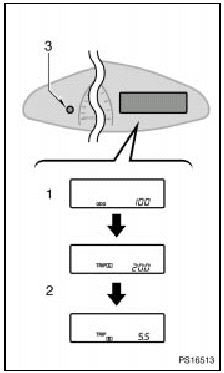
With tachometer
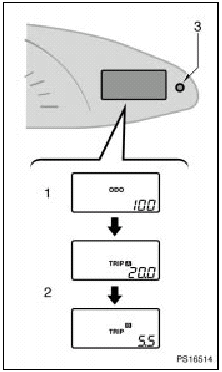
Without tachometer
This meter displays the odometer and two trip meters.
1. Odometer—Shows the total distance the vehicle has been driven.
2. Two trip meters—Shows two different distances independently driven since the last time each trip meter was set to zero.
You can use one trip meter to calculate the fuel economy and the other to measure the distance on each trip. All trip meter data is cancelled if the electrical power source is disconnected.
3. Trip meter reset knob—It can reset the two trip meters to zero, and also change the meter display.
To change the meter display, quickly push and release the knob. The meter display changes in the order from the odometer to trip meter A to trip meter B, then back to the odometer each time you push.
To reset the trip meter A to zero, display the meter A reading, then push and hold the knob until the meter is set to zero. The same process can be applied for resetting the trip meter B.
 Tachometer
The tachometer indicates engine speed in thousands of rpm (revolutions per
minute). Use it while driving to select correct shift points and to prevent engine
lugging and over-revving.
Driving ...
 Service reminder indicators and warning buzzers
If the indicator or buzzer comes on...
Do this.
(a)
If parking brake is off, stop immediately and contact Toyota
dealer.
(b)
Fasten driver’s sea ...
See also:
Vehicle specifications
Detailed vehicle information. ...
Front fender apron (ASSY)
REPLACEMENT
With the cowl top side panel removed.
REMOVAL
INSTALLATION
Temporarily install the new parts and measure each part of the new parts in accordance
with the body dimension diagra ...
Dimensions and weights
Overall length
mm (in.)
3825 (150.6)
Overall width
mm (in.)
1695 (66.7)
Overall height
mm (in.)
1530 (60.2)
Wheelbase
mm (in.)
2460 (96.9)
...