
 Toyota Yaris: Controls
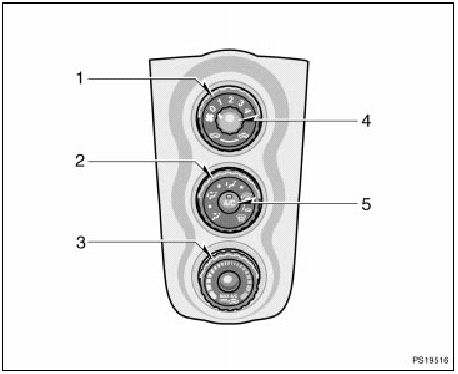
Controls
1. Air intake selector
2. Air flow selector
3. Temperature selector
4. Fan speed selector
5. “A/C” Button (on some models)
Fan speed selector
Turn the knob to adjust the fan speed—to the right to increase, to the left to decrease.
Temperature selector
Turn the knob to adjust the temperature— to the right to warm, to the left to cool.
Air flow selector
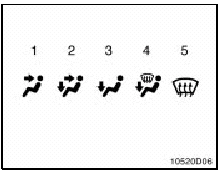
Turn the knob to select the vents used for air flow.
1. Panel—Air flows mainly from the instrument panel vents.
2. Bi-level—Air flows from both the floor vents and the instrument panel vents.
3. Floor—Air flows mainly from the floor vents.
4. Floor/Windshield—Air flows mainly from the floor vents and windshield vents.
Use with the air intake selector positioned in FRESH.
5. Windshield—Air flows mainly from the windshield vents.
Turning the air flow selector to the windshield position turns on the defogging function with the purpose of clearing the front view.
Use with the air intake selector positioned in FRESH.
Vehicles with “A/C” button—
Press the “A/C” button for dehumidified heating or cooling. This setting clears the front view more quickly.
For details about air flow selector settings, see “Air flow selector settings” described below.
Air intake selector
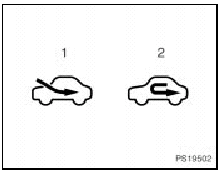
Turn the knob to select the air source.
1. Fresh—Draws outside air into the system.
2. Recirculate—Recirculates the air inside the vehicle.
“A/C” button (on some models)
To turn on the air conditioning, press the “A/C” button. The “A/C” button indicator will come on. To turn the air conditioning off, press the button again.


See also:
Operation in foreign countries
If you plan to drive your Toyota in another country...
First,
comply with the vehicle registration laws.
Second,
confirm the availability of the correct fuel (unleaded and minimum octane number ...
Using the AUX port/USB port
This port can be used to connect a portable audio device and listen to it
through the vehicle’s speakers.
For more information, please refer to the “Toyota Audio System Owner’s Manual”
or ...
Hood
Release the lock from the inside of the vehicle to open the hood.
Pull the hood lock release lever.
The hood will pop up slightly.
Pull up the auxiliary catch lever and lift the hood.
Hold t ...