
Toyota RAV4: Maintenance and care - Wireless remote control/electronic key battery
Replace the battery with a new one when it becomes depleted. A fresh battery helps restore reliable operation of the Toyota RAV4 wireless remote control and smart key system, if equipped.
■ If the key battery is depleted
A weak or depleted key battery may cause one or more of the following symptoms:
- The smart key system, if equipped, and the wireless remote control may respond inconsistently or fail to operate.
- The effective operating range of the key may become noticeably shorter.
Items to prepare
Prepare the following tools and replacement part before opening the key housing:
- Flathead screwdriver
- Small flathead screwdriver
- CR2032 lithium battery
■ Use a CR2032 lithium battery
- Replacement batteries are available from a Toyota dealer, electrical appliance retailer, camera store, or another suitable battery supplier.
- Install only the same battery type or an equivalent product recommended by the battery manufacturer.
- Dispose of the removed battery in accordance with applicable local regulations. Do not place it where children can reach it.
Replacing the battery
Vehicles without smart key system
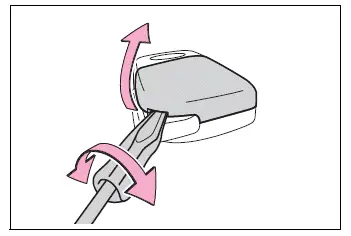
1. Remove the key cover.
Use a flathead screwdriver of a suitable size and work gently around the cover. Prying with excessive force can crack, deform, or mark the key housing.
Wrap the screwdriver tip with a soft cloth to protect the Toyota RAV4 key from scratches during removal.
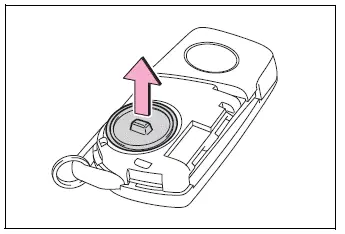
2. Remove the internal battery cover.
If the battery cover does not release easily, carefully lift one edge until the retaining points disengage. Avoid bending the cover or forcing the screwdriver too deeply into the housing.
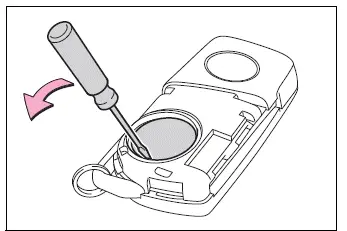
3. Remove the depleted battery.
Use a small screwdriver of the appropriate size and lift the battery carefully without damaging the surrounding terminals or plastic retainers.
Install the new CR2032 battery with the “+” terminal facing upward. Make sure the battery sits flat and securely in its holder.
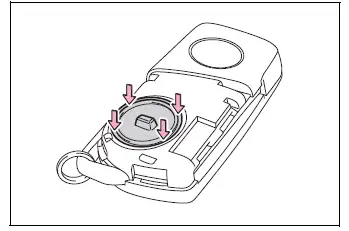
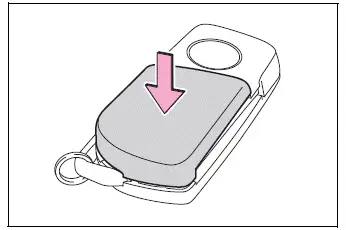
4. Reinstall the battery cover with its tab facing upward.
Press evenly around the entire edge of the battery cover until all retaining points are properly engaged with the key housing.
5. Reinstall the outer key cover.
Align the cover correctly with the key body, then press it straight into position without twisting it.
Inspect the full perimeter and confirm that the cover is securely attached, with no visible gaps between the cover and the key housing.
Vehicles with smart key system
1. Operate the release and remove the mechanical key from the electronic key housing.
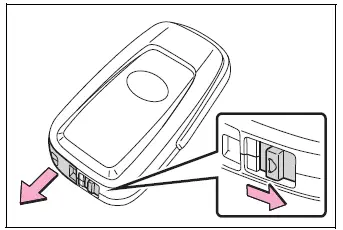
2. Remove the electronic key cover.
Use a flathead screwdriver of a suitable size. Do not force the housing apart, as excessive pressure may damage the cover or its retaining sections.
Wrap the screwdriver tip with a soft cloth before inserting it into the opening to prevent scratches and other surface damage.
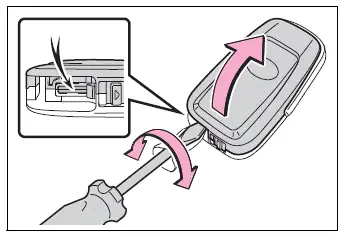
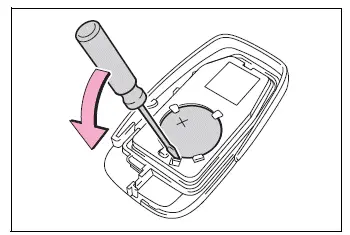
3. Remove the depleted battery with a small flathead screwdriver.
When the cover is separated, the electronic key module may remain attached to it, leaving the battery hidden from view. If this occurs, carefully remove the module from the cover before attempting to access the battery.
Use a screwdriver that fits the battery removal point correctly and avoid touching nearby electronic components.
Insert the replacement CR2032 battery with the “+” terminal facing upward, ensuring that it is seated securely beneath the retainers.
4. Reassemble the electronic key by completing the removal steps in reverse order. After installation, check that the cover is fully closed and test the key functions near the vehicle.
WARNING
■ Battery precautions
Observe all of the precautions below when handling a new or removed key battery.
Failure to handle the battery safely may result in death or serious injury.
- Never swallow the battery.
Swallowing a coin or button battery can cause severe internal chemical burns.
- The electronic key uses a coin-type or button-type battery. If swallowed, it can cause severe chemical burns in as little as 2 hours and may result in death or serious injury.
- Keep both new and removed batteries out of the reach of children at all times.
- If the key cover cannot be closed and secured firmly, stop using the electronic key. Store the key where children cannot reach it and contact a Toyota dealer.
- If a battery is swallowed or inserted into any part of the body, obtain emergency medical attention immediately. Do not wait for symptoms to appear.
■ To prevent battery explosion or leakage of flammable liquid or gas
- Replace the depleted battery only with a new battery of the same specified type. Installing an incorrect battery may cause overheating, leakage, or explosion.
- Do not expose the battery to extremely low atmospheric pressure, such as conditions associated with very high altitude, or to extremely high temperatures.
- Do not burn, crush, break, puncture, or cut the battery.
NOTICE
■ For normal operation after replacing the battery
Follow these precautions to protect the key components and maintain reliable operation:
- Always perform the replacement with clean, dry hands.
Moisture inside the key housing can corrode the battery, terminals, or nearby electronic parts.
- Do not touch, remove, or reposition any internal component other than the battery and the parts specifically described in the procedure.
- Do not bend, scratch, or apply excessive pressure to either battery terminal.