Toyota RAV4: Interior features - Using the Other Interior Features
Other Interior Features Toyota RAV4 fifth generation
Sun visors
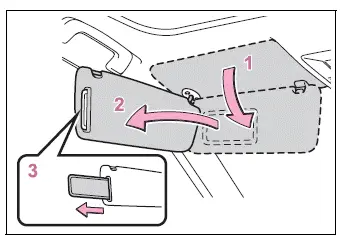
- To place the sun visor in the forward position, simply lower it toward the windshield.
- To use the visor at the side window, lower it, release it from the retaining hook, and swing it toward the side.
- To use the side extender, if equipped, move the visor to the side position and then slide the extender rearward for additional coverage.
Vanity mirrors
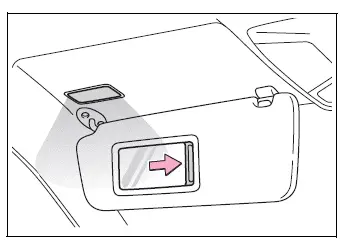
Slide the cover aside to open the vanity mirror.
The vanity light turns on automatically when the mirror cover is opened, providing convenient illumination inside the Toyota RAV4 cabin.
■ Automatic light shutoff to prevent battery discharge
If a vanity light remains on after the engine switch is turned to OFF, it will automatically turn off after approximately 20 minutes to help reduce unnecessary battery consumption.
NOTICE
■ To prevent battery discharge
Do not leave the vanity lights illuminated for an extended period while the engine is off. Prolonged use may discharge the Toyota RAV4 battery.
Power outlet
The power outlets can be used to operate compatible electrical accessories within the specified limits. The 12 V outlets are intended for accessories that operate at less than 10 A.
The 120 VAC outlet, if equipped, can supply power to compatible appliances that consume less than 100 W.
■ 12 V
Front
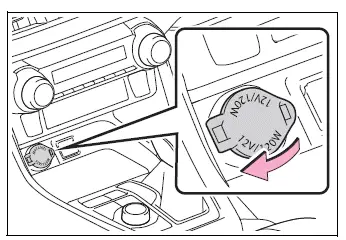
Open the protective lid to access the front 12 V power outlet.
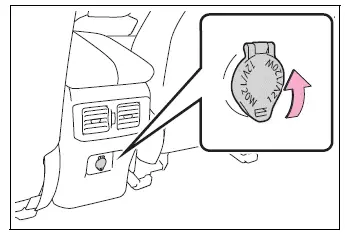
Rear (if equipped)
Open the protective lid to use the rear 12 V power outlet.
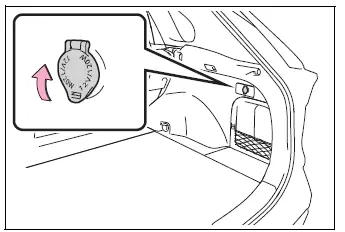
Luggage compartment (if equipped)
Open the lid to access the 12 V power outlet in the luggage compartment.
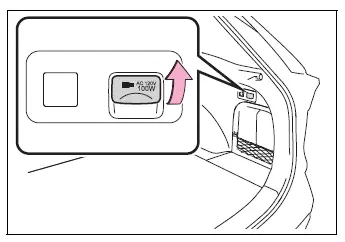
■ 120 VAC (if equipped)
Open the protective lid before connecting a compatible electrical appliance to the 120 VAC outlet.
■ Conditions for using the power outlets
12 V
The 12 V power outlets can be used when the engine switch is in ACC or ON.
120 VAC
The 120 VAC power outlet can be used when the engine switch is in ON.
■ When turning the engine switch to OFF
Disconnect electrical devices that include charging functions, such as portable battery packs, before turning the engine switch off.
If such a device remains connected, the engine switch may not turn off normally. Removing connected charging equipment also helps prevent unintended electrical operation.
NOTICE
■ When a power outlet is not in use
Close the power outlet lid whenever the outlet is not being used. Keeping the lid closed protects the socket and helps prevent damage.
Foreign objects or liquids entering a power outlet may cause a short circuit or interfere with proper operation.
■ To prevent a blown fuse or interrupted power supply
- 12 V
Do not connect an accessory that requires more than 12 V and 10 A. Exceeding this limit may overload the electrical circuit.
- 120 VAC
Do not use a 120 VAC appliance that consumes more than 100 W. If an appliance requiring more than 100 W is connected, the protection circuit will interrupt the power supply.
■ To prevent battery discharge
Do not use a power outlet longer than necessary while the engine is not running. Extended use may discharge the Toyota RAV4 battery and affect engine starting.
■ Appliances that may not operate properly with the 120 VAC outlet
The following types of 120 VAC appliances may not operate correctly even when their rated power consumption is below 100 W:
- Appliances that require high initial peak wattage when starting
- Measuring instruments or devices that process highly precise data
- Other appliances that require an exceptionally stable power supply
USB Type-C Charging Ports Toyota RAV4 compact crossover
The USB Type-C charging ports provide electrical power to compatible external devices at up to 3 A and 5 V, allowing supported smartphones and other portable equipment to be charged inside the Toyota RAV4.
The USB Type-C ports are intended exclusively for charging. They do not support data transfer, multimedia connections, or communication with the vehicle’s systems.
Charging performance may vary depending on the specifications, condition, and power requirements of the connected external device. Some devices may charge slowly or may not charge correctly.
Before connecting a device to a USB charging port, refer to the operating instructions supplied with that device and confirm that its charging requirements are compatible.
■ Using the USB Type-C charging ports
Console box
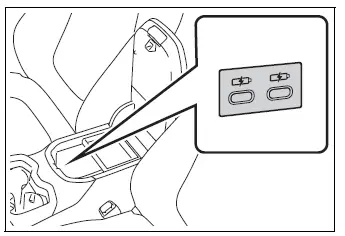
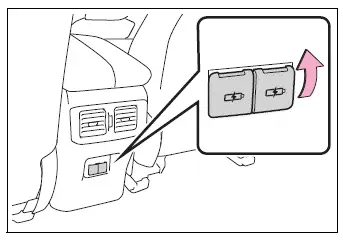
Rear (if equipped)
Open the protective lid to access the rear USB Type-C charging ports.
■ Conditions for using the USB Type-C charging ports
The USB Type-C charging ports can be used when the engine switch is in ACC or ON.
■ Situations in which the USB Type-C charging ports may not operate correctly
- A connected device requires more than 3 A at 5 V.
- A device designed primarily for communication with a personal computer, such as a USB memory device, is connected.
- The connected external device is turned off and does not accept charging while powered down, depending on its design.
- The temperature inside the Toyota RAV4 is extremely high, such as after the vehicle has been parked in direct sunlight for an extended period.
■ About connected external devices
Depending on the type and operating condition of the connected device, charging may occasionally stop and then resume automatically. This behavior can occur as the device regulates its power supply and does not necessarily indicate a malfunction of the charging port.
NOTICE
■ To prevent damage to the USB Type-C charging ports
- Do not insert foreign objects, unsuitable connectors, or damaged plugs into the ports.
- Do not allow water, beverages, or any other liquids to enter the ports.
- When the USB Type-C charging ports are not being used, close their protective lids. Foreign objects or liquids entering a port may cause a short circuit or damage the electrical components.
- Do not apply excessive force to the ports or subject them to strong impacts while connecting or disconnecting a cable.
- Do not disassemble, alter, or attempt to modify the USB Type-C charging ports.
■ To prevent damage to external devices
- Do not leave external devices inside the vehicle, particularly in hot weather. The temperature in the passenger compartment may rise significantly and damage the device or its battery.
- Do not press down on, pull, bend, or apply unnecessary force to a connected external device or its charging cable. Excessive pressure may damage the cable, connector, or Toyota RAV4 USB Type-C charging port.
■ To prevent battery discharge
Do not use the USB Type-C charging ports for an extended period while the engine is off. Prolonged charging may discharge the vehicle battery and affect the ability to start the engine.
Wireless Charger Toyota RAV4 compact crossover
A compatible portable device can be charged simply by placing it on the charging area. The wireless charger supports Qi-standard devices certified according to the specifications of the Wireless Power Consortium, including compatible smartphones, portable battery packs, and similar equipment.
This function cannot be used with portable devices that are larger than the charging tray or cannot be positioned securely within the designated charging area.
Charging performance may vary depending on the design, dimensions, protective case, and charging coil position of the portable device. Some devices may not charge normally even when they support the Qi standard. Before using the Toyota RAV4 wireless charger, read the operating instructions supplied with the device.
■ The "Qi" logo
The "Qi" logo is a registered trademark of the Wireless Power Consortium and identifies products designed to comply with its wireless charging standard.

■ Names of all parts
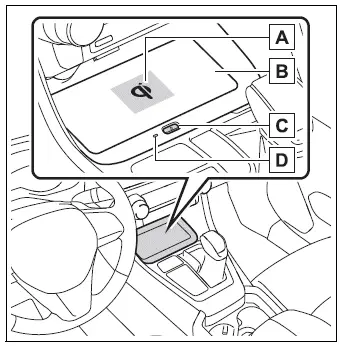
- Charging area*
- Charging tray
- Power supply switch
- Operation indicator light
*: Both portable devices and wireless chargers contain charging coils that must be correctly aligned for charging to begin.
The charging coil inside the wireless charger can move within the charging area near the center of the tray. When the system detects the charging coil inside a compatible portable device, the Toyota RAV4 wireless charger moves its internal coil toward the detected position and begins supplying power. If the portable device shifts and its charging coil moves outside the available charging area, charging stops automatically.
If two or more portable devices are placed on the charging tray at the same time, the system may be unable to identify their charging coils correctly. As a result, one or all of the devices may not charge. Place only one compatible device on the tray during normal use.
■ Using the wireless charger
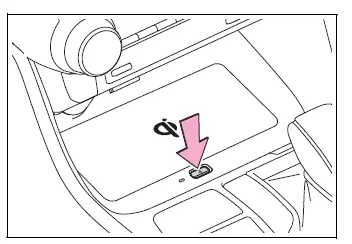
1. Press the wireless charger power supply switch.
The wireless charger turns on or off each time the power supply switch is pressed.
When the charger is switched on and ready for use, the operation indicator light illuminates green.
The selected on or off state of the power supply switch is stored even after the engine is turned off, allowing the Toyota RAV4 wireless charger to retain its previous setting.
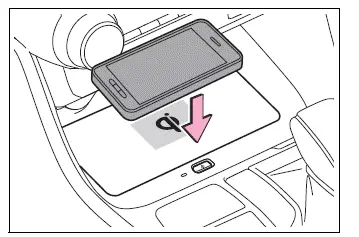
2. Place the portable device on the charging tray.
Position the charging side of the portable device facing downward, with the center of the device aligned as closely as possible with the center of the charging area. On some portable devices, the internal charging coil is not located at the exact center. In this situation, adjust the position of the device so that its charging coil is centered within the charging area.
While charging is in progress, the operation indicator light illuminates orange.
If charging does not begin, reposition the portable device closer to the center of the charging area. When charging cannot be established, the operation indicator light may slowly alternate between green and orange. A repeated operating sound may also be heard as the internal charging coil attempts to locate and align with the coil in the portable device.
When charging is complete, the operation indicator light changes to green.
■ Recharging function
- After charging has been completed and the device has remained in a suspended charging state for a specified period, charging may restart automatically to maintain the battery charge.
- If the portable device moves significantly within the charging area, alignment between the charging coils may be lost and charging may stop temporarily. When the wireless charger detects the portable device coil again, its internal charging coil moves toward the detected position and charging resumes automatically.
■ Rapid charging function
- The following types of portable devices support rapid wireless charging:
- Portable devices that comply with WPC Version 1.2.4 and are designed to support rapid charging.
- iPhones with an iOS version that supports 7.5 W wireless charging, including iPhone 8 and later models.
- To activate the rapid charging function, press the wireless charger power supply switch three times while charging is in progress. When rapid charging is available, the operation indicator changes from a steady orange light to alternating flashes of green and orange.
- When charging is complete, rapid charging mode stops automatically. To use rapid charging again during a later charging session, activate the function again using the power supply switch.
■ Lighting conditions of the operation indicator light
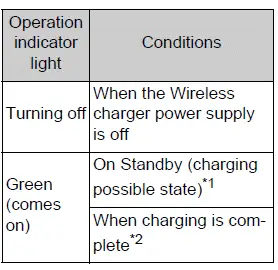
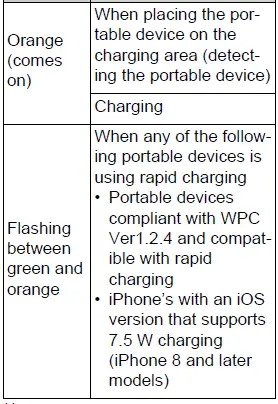
*1: No charging power is supplied while the wireless charger is in standby. If a metallic object is placed on the charging tray in this state, it will not be heated by charging power.
*2: Depending on the portable device being used, the operation indicator light may remain illuminated in orange even after charging has been completed. This does not necessarily indicate that charging is still continuing.
■ When the operation indicator light flashes
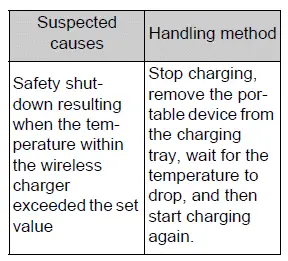
If an error occurs while using the wireless charger, the operation indicator light flashes orange. The flashing pattern identifies the type of condition that has been detected, allowing the driver to determine the appropriate response.
Check the pattern carefully and handle the issue according to the corresponding information shown in the following tables. Before attempting to charge again, make sure the portable device is positioned correctly and that no unsuitable object is present on the charging area.
- Flashes repeatedly once every second (orange)
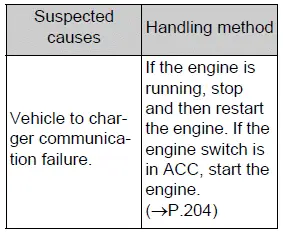
- Flashes three times continuously in a repeating pattern (orange)
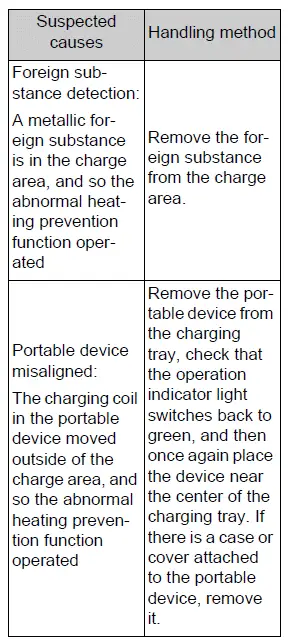
- Flashes four times continuously in a repeating pattern (orange)
■ The wireless charger can be operated when
The wireless charger is available when the engine switch is in ACC or ON. If the engine switch is placed in another position, charging will not begin or will stop.
■ Usable portable devices
- The wireless charger can be used with portable devices that comply with the Qi wireless charging standard. However, operation and compatibility cannot be guaranteed for every Qi-compatible device, because charging performance may vary according to the device design and operating conditions.
- The system is primarily intended for low-power portable electronics, including mobile phones and smartphones, that require no more than 5 W of charging power.
- Charging above 5 W is also supported for the following compatible portable devices:
- Charging at 7.5 W or less is supported for iPhone models that are compatible with 7.5 W wireless charging.
- Charging at 10 W or less is supported for portable devices that comply with the Extended Power Profile output specified by WPC Standard Version 1.2.4.
■ Using the smart key system
If the Toyota RAV4 smart key system attempts to detect the electronic key while a portable device is charging, wireless charging may be temporarily interrupted. Charging should resume after the key detection process has finished and the necessary operating conditions are restored.
■ When covers and accessories are attached to portable devices
Do not attempt to charge a portable device while it is fitted with a cover or accessory that is not compatible with Qi wireless charging. Certain covers, including some genuine manufacturer parts, as well as attached accessories, may prevent the device from charging correctly. If charging does not begin even though the portable device has been placed on the charging area, remove the cover and any accessories, then position the device on the tray again.
■ When noise enters the AM radio during charging
- Turn off the wireless charger and check whether the AM radio noise decreases. If the interference is reduced, press and hold the wireless charger power supply switch for approximately 2 seconds. This changes the charger frequency and may reduce the noise. When the frequency is changed, the operation indicator light flashes orange twice.
- iPhone models use a specific frequency for rapid wireless charging.
Depending on the installed iOS version, rapid charging may not be available while the wireless charger frequency is being switched. Charging behavior can therefore differ after the frequency adjustment.
■ Important points about the wireless charger
- If the electronic key cannot be detected inside the Toyota RAV4, wireless charging cannot be performed.
Charging may also be interrupted temporarily when a door is opened and then closed, as the smart key system may perform another key-detection operation.
- The wireless charging unit and the portable device may become warm during charging. This is normal and does not indicate a malfunction.
If the portable device becomes too warm, its internal protection function may stop charging. Allow the device temperature to decrease sufficiently before placing it on the charging area and attempting to charge it again.
The fan may begin operating to reduce the temperature inside the wireless charger. This is part of the normal temperature-control process and does not indicate a malfunction.
■ Operation sounds
A buzzing sound may be heard when the power supply switch is pressed to turn on the wireless charger, when the engine switch is changed to ACC or ON while the charger is enabled, or when the system detects a portable device. These operating sounds are normal and do not indicate a problem with the Toyota RAV4 wireless charging unit.
■ If the smartphone operating system has been updated
When a smartphone operating system is updated to a newer version, the device’s wireless charging specifications or behavior may change significantly. Charging speed, compatibility, or certain charging functions may therefore differ after an update. For current details, refer to the information provided on the smartphone manufacturer’s official website.
■ Trademark information
iPhone is a trademark of Apple Inc., registered in the United States and other countries.
WARNING
■ Caution while driving
For safety, the driver must not operate the portable device itself while it is being charged during driving. Handling or viewing the device may distract the driver from the road and surrounding traffic conditions.
■ Caution while the vehicle is in motion
Do not charge lightweight devices, such as wireless headphones, while the Toyota RAV4 is moving. Because these devices are very light, they may slide or be thrown from the charging tray during sudden braking, steering, or acceleration, potentially causing an unexpected accident.
■ Caution regarding interference with electronic medical devices
People who use an implantable cardiac pacemaker, cardiac resynchronization therapy pacemaker, implantable cardioverter-defibrillator, or any other electrical medical device should consult their physician regarding use of the wireless charger. The charger may affect the operation of certain medical devices under some conditions.
■ To prevent malfunctions, electric shock, or burns
Observe all of the following precautions whenever the wireless charger is used.
Failure to follow these precautions may cause equipment failure or damage, fire, burns resulting from overheating, or electric shock.
- Do not place or insert metallic objects between the charging area and the portable device while charging.
- Do not attach aluminum stickers or other metallic objects to the charging area.
- Do not attach an aluminum sticker or any other metallic object to the side of the portable device, case, or cover that contacts the charging area.
- Do not use the charging tray as a storage compartment for coins, keys, cards, or other small objects.
- Do not subject the wireless charger to strong force, pressure, or impact.
- Do not disassemble, modify, remove, or otherwise interfere with the charging unit.
- Do not attempt to charge devices other than the specified compatible portable devices.
- Keep magnetic items away from the charging area and the portable device during charging.
- Do not charge a device when the charging area is covered with dust, dirt, or other debris.
- Do not cover the wireless charger or portable device with a cloth or similar material while charging, as this may trap heat.
NOTICE
■ Situations in which the function may not operate normally
A portable device may not charge correctly, may charge slowly, or may stop charging in any of the following situations. Check the device position and surrounding conditions before assuming that the Toyota RAV4 wireless charger is malfunctioning.
- The portable device is already fully charged.
- The portable device is being charged while a charging cable is connected.
- Foreign matter is present between the charging area and the portable device.
- The portable device has become hot as a result of charging.
- The temperature around the charging tray is 95°F (35°C) or higher, such as when the vehicle interior is exposed to extreme heat.
- The portable device has been placed with its charging side facing upward rather than toward the charging area.
- The charging coil inside the portable device is not correctly aligned with the charging area. Small portable devices, including certain foldable devices, may move out of alignment while the vehicle is being driven.
- The portable device is larger than the charging tray and cannot be positioned correctly within the charging area.
- The camera lens protrudes 3 mm (0.12 in.) or more from the surface of the portable device, preventing the device from lying properly against the charging area.
- The Toyota RAV4 is in an area where strong radio waves, electrical interference, or electromagnetic noise are present, such as near a television tower, power plant, gasoline station, broadcasting station, large electronic display, airport, or similar facility.
- Any of the following objects measuring 0.08 in. (2 mm) or more in thickness is positioned between the charging side of the portable device and the charging area:
- A thick case or protective cover.
- A thick decorative attachment.
- An accessory such as a finger ring, grip, strap, or similar item.
- The portable device is touching or covered by any of the following metallic objects:
- A card containing metal, aluminum foil, or similar material.
- A wallet or bag made from metal or containing metallic material.
- Coins or other loose metallic objects.
- A heating pad or similar warming product.
- CDs, DVDs, or other disc-type media.
- A metallic accessory attached to the portable device.
- A case or protective cover made from metal.
- A case containing a magnet on the charging side of the portable device.
- Radio-wave-type wireless remote controls are being operated nearby and are interfering with charging.
- The electronic key is not present inside the vehicle.
- Two or more portable devices have been placed on the charging tray at the same time.
If charging does not proceed normally, or if the operation indicator light continues flashing for a reason not described above, the wireless charger may have developed a malfunction.
Stop using the charger and contact your Toyota dealer to have the Toyota RAV4 wireless charging system inspected.
■ To prevent malfunctions and data corruption
- While charging, do not place credit cards, other magnetic cards, or magnetic storage media near the charging area. Exposure to the charger’s magnetic field may erase or corrupt stored information. Wristwatches and other precision instruments should also be kept away from the charging tray, as magnetic influence may interfere with their operation or cause a malfunction.
- Do not charge a portable device with a contactless IC card, such as a public transportation card, positioned between the charging side of the device and the charging area. The IC chip may become extremely hot, potentially damaging the card, the portable device, or both. Pay particular attention when using a phone case or protective cover that contains an attached or concealed contactless IC card, and remove the card before placing the device on the Toyota RAV4 wireless charger.
- Do not leave portable devices inside the vehicle, particularly during extremely hot weather. The temperature inside a parked Toyota RAV4 can rise significantly, and prolonged exposure to excessive heat may damage the device, reduce its performance, or cause it to malfunction.
■ To prevent battery discharge
Do not operate the wireless charger for an extended period while the engine is stopped. Prolonged use under these conditions may discharge the vehicle battery and prevent the engine from starting normally.
Armrest Toyota RAV4 2026
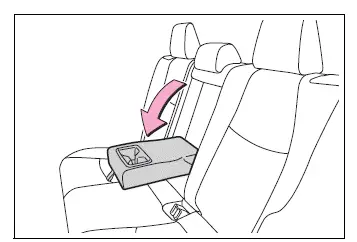
Fold down the rear-seat armrest whenever it is needed for added passenger comfort. Return it to its upright position when it is not in use.
NOTICE
■ To prevent damage to the armrest
Do not sit on the armrest or place excessive weight on it. Applying too much force may damage the armrest or its folding mechanism.
Assist grips
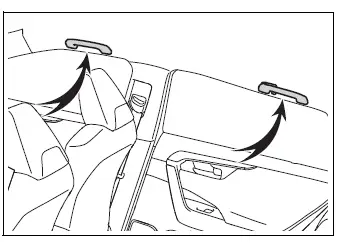
The assist grips installed on the ceiling can be used to help support your body while you are seated. They are intended to provide additional stability for occupants during normal vehicle movement.
WARNING
■ Assist grips
Do not use an assist grip when entering or exiting the Toyota RAV4, or when attempting to rise from your seat. The grip is not designed to support your full body weight, and improper use may result in a fall or injury.
NOTICE
■ To prevent damage to the assist grip
Do not hang heavy objects from the assist grip or apply an excessive load to it. Doing so may damage the grip or its mounting points.
Coat hooks
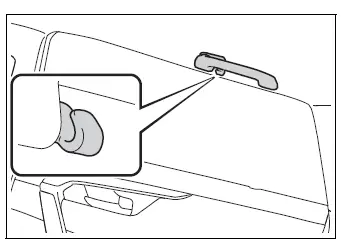
Coat hooks are integrated into the rear assist grips and can be used for lightweight clothing or other suitable soft items.
WARNING
■ Items that must not be hung on the hooks
Do not hang coat hangers or other hard, heavy, or sharp objects from the hooks. If the SRS curtain shield airbags deploy, these items could be thrown through the cabin as projectiles, potentially causing death or serious injury.
Garage door opener Toyota RAV4 2026
The HomeLink garage door opener can be programmed to operate compatible garage doors, gates, entry doors, door locks, home lighting, security systems, and other remotely controlled devices.
■ HomeLink programming procedure
Programming instructions for the HomeLink system are also available through the following website. Refer to the online information when additional guidance is required for a particular device.
Website: www.homelink.com/toyota

For additional assistance with programming or compatibility, contact HomeLink customer support using the number below.
Help Line: 1-800-355-3515
System components
The HomeLink wireless control system installed in the Toyota RAV4 includes three programmable buttons. Each button can store a code for a different compatible device, allowing up to three devices to be controlled. Review the programming methods on the following pages and select the procedure that matches the type of remote control or opening system being registered.
Vehicles with auto anti-glare inside rear view mirror
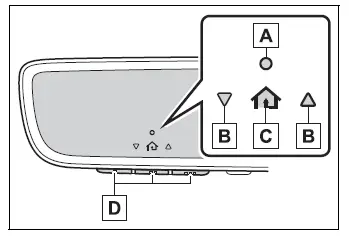
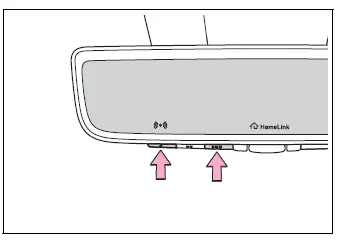
- HomeLink indicator light
- Garage door operation indicators
- HomeLink icon
Illuminates while the HomeLink system is operating. - HomeLink buttons
Vehicles with Digital Rearview Mirror
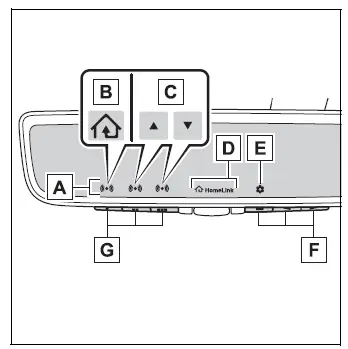
- HomeLink indicator light
Illuminates above the selected button. - HomeLink icon
- Garage door operation indicators
- HomeLink logo
Appears while HomeLink is operating.
When a HomeLink button is pressed, the logo may disappear even though the system continues operating. - Settings icon
Press the menu button to access and change the available settings. - Menu buttons
- HomeLink buttons
■ Codes stored in the HomeLink memory
- Programmed codes remain stored even if the vehicle battery cable is disconnected.
- If an attempt to register a new code to a HomeLink button is unsuccessful, the code already stored for that button will not be erased. The previously programmed device can therefore continue to be operated.
WARNING
■ When programming a garage door or another remote-controlled device
The garage door, gate, or other connected device may begin operating during programming. Before starting, make sure that all people, pets, vehicles, and other objects are clear of the operating area to prevent injury or property damage.
■ Conforming to federal safety standards
Do not use the HomeLink-compatible transceiver with any garage door opener or other device that does not include the safety stop and automatic reverse functions required by federal safety standards.
This restriction includes garage doors that cannot detect an obstruction in their path. Operating a door or device without these safety features significantly increases the risk of death or serious injury.
■ When operating or programming HomeLink
Never allow a child to operate, program, or play with the HomeLink buttons. Unintended activation of a garage door, gate, or another connected device may create a serious hazard.
Programming HomeLink Toyota RAV4 2026
■ Before programming HomeLink
- During the programming process, a garage door, gate, or another connected device may begin operating unexpectedly. Before starting, make sure that all people, pets, vehicles, and other objects are safely away from the garage door or device to reduce the risk of injury or property damage.
- For more reliable programming, it is recommended that a new battery be installed in the remote control transmitter. A weak transmitter battery may reduce the signal strength and prevent the Toyota RAV4 HomeLink system from learning the code correctly.
- Garage door opener motors manufactured after 1995 may use rolling-code protection. If your opener has this feature, access to the “Learn” or “Smart” button on the garage door opener motor may be required. Use a stepladder or another stable and secure platform if the button cannot be reached safely from the floor.
■ Programming HomeLink
Steps 2 through 4 must be completed within 60 seconds. If this time limit is exceeded, the HomeLink indicator light will stop flashing and the programming procedure will not be completed successfully. Restart the procedure from the appropriate step if the indicator stops flashing.
1. Vehicles with Digital Rearview Mirror: Press the HomeLink button or the menu button.
When the HomeLink button is pressed:
The HomeLink Training Tutorial will appear on the Digital Rearview Mirror display and provide instructions for programming the HomeLink system in the Toyota RAV4.
When the HomeLink Training Tutorial is displayed, follow each instruction shown on the screen.
When the menu button is pressed: Press the menu button  and select “Set Up >”. The HomeLink Training Tutorial will then be displayed to guide you through the programming procedure.
When the HomeLink Training Tutorial appears, follow the displayed instructions carefully and complete each step in the indicated order.
2. Press and release the HomeLink button that you want to program, then confirm that the HomeLink indicator light begins flashing orange.
3. Aim the remote control transmitter for the garage door, gate, or other device toward the rearview mirror. Hold the transmitter approximately 1 to 3 in. (25 to 75 mm) away from the HomeLink buttons.
Keep the HomeLink indicator light clearly visible throughout the programming process so that changes in its flashing pattern can be identified.
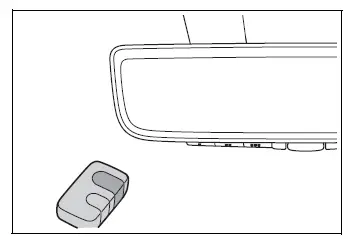
4. Program the selected device by using the procedure that applies to its remote control system.
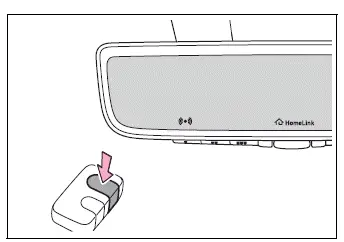
Programming a device other than an entry gate (for U.S.A.
owners)
Press and hold the appropriate button on the remote control transmitter. Continue holding it until the HomeLink indicator light changes from a slow orange flash to either a rapidly flashing green light for a rolling-code device or a continuously illuminated green light for a fixed-code device. Release the transmitter button as soon as the corresponding indication appears.
Programming an entry gate (for U.S.A. owners)/Programming a device in the Canadian market
Press and release the remote control transmitter button repeatedly at intervals of approximately 2 seconds. Continue this process until the HomeLink indicator light changes from slowly flashing orange to rapidly flashing green for a rolling-code device or remains continuously illuminated green for a fixed-code device.
5. Test HomeLink operation by pressing the newly programmed button and observing the HomeLink indicator light. The indicator response shows whether additional programming is required.
- The HomeLink indicator light illuminates continuously: Programming of a fixed-code device has been completed.
The garage door, gate, or other connected device should operate when the programmed HomeLink button is pressed and released.
- The HomeLink indicator light flashes rapidly: The garage door opener or other connected device uses a rolling code. The Toyota RAV4 HomeLink button has learned the transmitter signal, but the rolling-code registration procedure must be completed before the device can operate normally.
To complete the programming process, firmly press and hold the selected HomeLink button for approximately 2 seconds, then release it. This step may need to be performed as described to confirm that the device has accepted the stored signal.
6. Repeat the preceding steps to program another compatible device to any of the remaining HomeLink buttons. Each available button can be programmed separately for a different garage door, gate, or supported remote-controlled device.
■ Programming a rolling code system
Two or more people may be required to complete rolling-code programming safely and within the specified time limits. One person can remain inside the Toyota RAV4 while another accesses the garage door opener motor.
1. Locate the “Learn” or “Smart” button on the garage door opener motor inside the garage.
This button is commonly positioned near the point where the hanging antenna wire connects to the opener unit. Its name, color, and exact location vary by manufacturer. Refer to the owner’s manual supplied with the garage door opener motor for model-specific information.
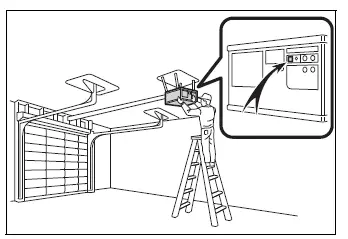
2. Press and release the “Learn” or “Smart” button on the garage door opener motor.
Step 3 must be performed within 30 seconds after completing step 2. Prepare to return to the vehicle immediately so the programming sequence can be continued before the opener exits its learning mode.
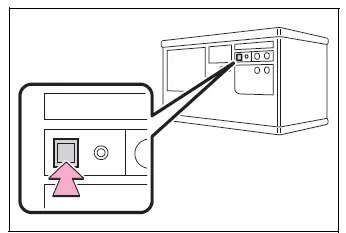
3. Inside the vehicle, press and hold the desired HomeLink button for approximately 2 seconds, then release it. Repeat this press, hold, and release sequence up to three times as necessary to complete the rolling-code registration.
If the garage door opener motor activates when the HomeLink button is pressed, the opener has recognized the HomeLink signal and programming has been completed successfully.
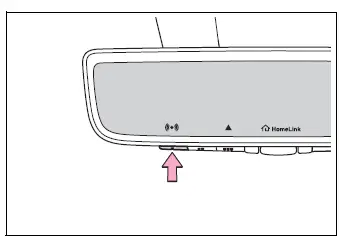
■ Enabling 2-way communication with a garage door (only available for compatible devices)
When this feature is enabled, 2-way communication allows the driver to check whether a compatible garage door is opening or closing by observing the garage door operation indicators inside the vehicle. The indicators provide confirmation of the door’s reported operating status.
2-way communication is available only when the garage door opener motor supports this function. To verify whether a particular opener is compatible, refer to the device information available at www.homelink.com.
1. Within 5 seconds after garage door opener programming has been completed, check the indicators. If the garage door opener motor has been successfully trained to HomeLink, both garage door operation indicators will flash rapidly in green and the light on the opener motor will blink twice, confirming that 2-way communication has been enabled.
If the indicators do not flash as described, perform steps 2 and 3 within the first 10 presses of the programmed HomeLink button after the initial programming procedure has been completed.
2. Press the programmed HomeLink button to operate the garage door, then allow the opening or closing movement to finish.
3. Within 1 minute after pressing the HomeLink button, and after the garage door has stopped moving, press the “Learn” or “Smart” button on the garage door opener motor. When 2-way communication is established, both garage door operation indicators in the Toyota RAV4 will flash rapidly in green within 5 seconds, and the light on the garage door opener motor will blink twice. These responses confirm that the vehicle and opener can exchange garage door operating information.
■ Reprogramming a single HomeLink button
The following procedure can be used to replace the code assigned to an individual HomeLink button. Any device already registered to that button will be overwritten, while codes stored under the other HomeLink buttons will remain unchanged.
1. Press and hold the HomeLink button that you want to reprogram.
2. When the HomeLink indicator light begins flashing orange, release the HomeLink button and continue with step 1 of the “Programming HomeLink” procedure. It takes approximately 20 seconds of holding the button before the indicator starts flashing. Releasing the button too early may prevent the existing code from being replaced.
■ Before programming
- Install a new battery in the remote control transmitter before beginning. A fresh battery helps provide a strong and consistent signal during the programming process.
- Hold the transmitter with its battery side facing away from the HomeLink buttons. Keep the transmitter correctly oriented while the Toyota RAV4 HomeLink system learns the signal.
Operating HomeLink
Press the HomeLink button assigned to the desired garage door, gate, or other compatible device. The HomeLink indicator light should illuminate while the stored command is being transmitted.
For a compatible garage door opener with 2-way communication enabled, the opening or closing status of the garage door is shown by the garage door operation indicators inside the vehicle.
Vehicles with auto anti-glare inside rear view mirror
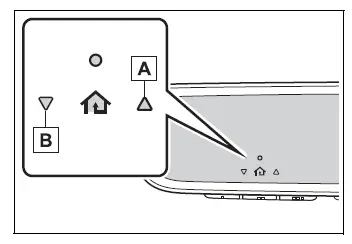
- Garage door opening indicator
- Garage door closing indicator
Vehicles with Digital Rearview Mirror
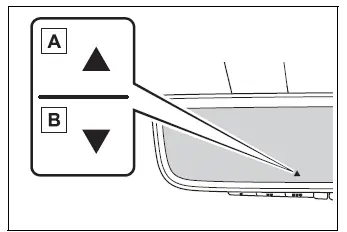
- Garage door opening indicator
- Garage door closing indicator
This status-display function is available only when the garage door opener motor supports HomeLink 2-way communication. To check whether a particular device is compatible, refer to the information provided at www.homelink.com.
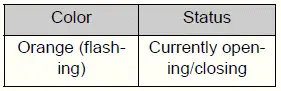
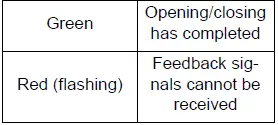
The garage door operation indicators can receive status information when the Toyota RAV4 is within approximately 820 ft. (250 m) of the garage door. The effective communication distance may be reduced when houses, trees, structures, or other obstructions are located between the vehicle and the garage door opener. Under these conditions, the feedback signal may not reach the vehicle even though the door has operated.
To recall the previously received garage door status, simultaneously press and release either HomeLink buttons  and
and  or
or  and
and  for vehicles with an auto anti-glare inside rearview mirror, or
  and
and  or
or  and
and  for vehicles with a Digital Rearview Mirror. The most recently recorded opening or closing status will be displayed for approximately 3 seconds.
Erasing the entire HomeLink memory (all three codes)
Press and hold the two outside HomeLink buttons simultaneously for approximately 10 seconds. Continue holding them until the HomeLink indicator light changes from continuously illuminated orange to rapidly flashing green. This procedure erases all three programmed codes from the HomeLink memory, so each required device will need to be programmed again afterward.
If the Toyota RAV4 is sold or transferred to another owner, erase all stored HomeLink programs before handing over the vehicle. This prevents the new owner from retaining access to garage doors, gates, or other devices that were previously registered.