
Toyota RAV4: Vehicle status information and indicators - Multi-information display (with 7-inch multi-information display)
Display contents Toyota RAV4
The multi-information display presents driving data, vehicle status details, assistance information, settings, and warning messages in a clear central location for the Toyota RAV4 driver.
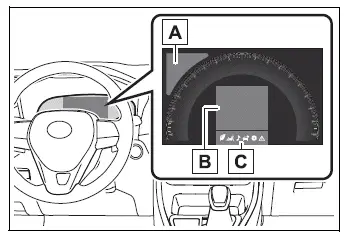
- Driving support system information
Displays road signs recognized by the RSA system (if equipped)  while the function is operating.
When one of the following driving support systems is active and a different menu icon is selected, the display shows a corresponding operating image:
- LTA (Lane Tracing Assist)
- Dynamic radar cruise control with full-speed range
- Information display area
A range of driving and vehicle information can be viewed by selecting the appropriate menu icon with the meter control switches.
Depending on the situation, warning messages, suggestions, or advisory pop-up notifications may also appear automatically to draw the driver's attention to relevant conditions.
- Menu icons
■ The multi-information display is displayed when
The multi-information display operates when the engine switch is in ON, making current vehicle information and available menu functions accessible.
■ When changing driving mode
- The background color of the multi-information display changes to reflect the selected driving mode, providing a visual indication of the active setting.
- AWD models: The background color changes according to the selected driving mode or Multi-terrain Select mode, helping the driver identify the current Toyota RAV4 configuration at a glance.
■ Liquid crystal display
Small dark or bright spots may occasionally be visible on the screen. This is a normal characteristic of liquid crystal display technology and does not indicate a malfunction or prevent continued use of the display.
WARNING
■ Caution for use while driving
- When operating the multi-information display while driving, remain fully aware of surrounding traffic, pedestrians, road conditions, and nearby objects.
- Do not stare continuously at the multi-information display while the vehicle is moving. Looking away from the road for an extended period may prevent you from noticing pedestrians, obstacles, or other hazards ahead.
Changing the display Toyota RAV4 fifth generation
The multi-information display is controlled using the meter control switches located on the steering wheel, allowing the driver to browse menus and adjust supported items.
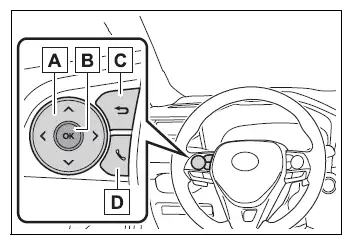
- Scroll through the screen*/switch the displayed page*/move the cursor
- Press: Enter or confirm a setting
Press and hold: Reset the selected item or display available customization options - Return to the previous screen
- Display outgoing calls, incoming calls, and call history (if equipped)
When linked with the hands-free system, information related to sending or receiving a call appears on the display. For details about hands-free operation, refer to the "MULTIMEDIA OWNER'S MANUAL".
*: On screens that support scrolling or switching between multiple pages, a scroll bar or circular page indicator appears to show the current position or number of registered screens.
WARNING
■ Caution for use while driving
For safety, avoid operating the meter control switches while driving whenever possible, and never look continuously at the multi-information display while the Toyota RAV4 is moving.
Stop the vehicle in a safe location before making detailed selections or adjustments. Attempting to operate the switches while driving may interfere with steering wheel control and could result in an unexpected accident.
Menu icons
Information assigned to each menu icon can be opened by selecting the icon with the meter control switches.
Certain screens or notifications may appear automatically when vehicle conditions require the driver's attention, even if another menu is currently selected.
 Driving information display
 Driving support system information display
 Audio system-linked display (if equipped)
 Vehicle information display
 Settings display
 Warning message display
Driving information display Toyota RAV4 fifth generation
Select this menu to view fuel consumption and driving efficiency data in several useful formats, helping the driver monitor how the Toyota RAV4 is using fuel under current operating conditions.
■ Fuel Economy
The following fuel economy information is displayed.
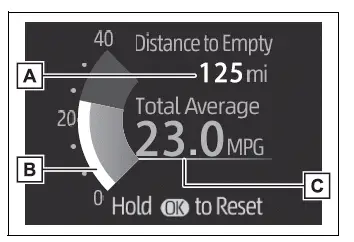
- Distance to empty
Shows the estimated distance the vehicle can travel using the fuel currently remaining in the tank. - Current fuel economy
Displays instantaneous fuel consumption, allowing changes in efficiency to be observed as driving conditions and accelerator use vary. - Average fuel economy
Shows the average fuel economy since the function was reset, since the engine was started, or after refueling, depending on the selected display setting.*1, 2, 3
The type of average fuel economy selected through "Fuel Economy"  on the settings screen is shown in this display.
*1: Use the displayed fuel consumption value as a general reference, as actual fuel use may vary with traffic, road, weather, and driving conditions.
*2: The average fuel economy calculated since the function was reset can be cleared by pressing and holding  .
.
*3: The average fuel economy after starting is reset each time the engine is stopped.
■ Eco Driving Indicator/Distance to empty
Display contents
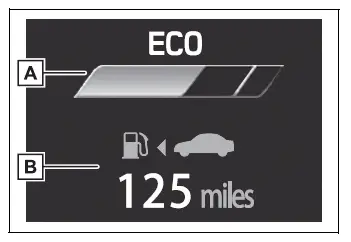
- Eco Driving Indicator
- Distance to empty
Displays the estimated driving range available with the fuel remaining in the tank.
Eco Driving Indicator
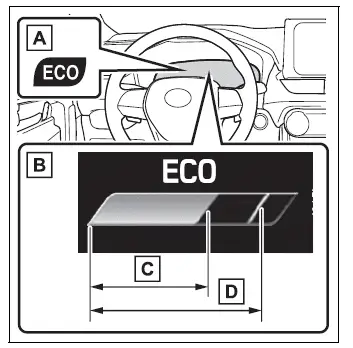
- Eco Driving Indicator Light
During acceleration that remains within the economical operating range, the Eco Driving Indicator Light illuminates to show that the vehicle is being driven in an efficient manner.
When acceleration moves beyond the Eco driving zone, or when the vehicle comes to a stop, the light turns off.
- Eco Driving Indicator Zone Display
Shows the recommended Eco driving zone together with the current Eco driving ratio, which is determined according to accelerator operation.
- Eco driving ratio based on acceleration
If acceleration exceeds the Eco driving zone, the right side of the Eco Driving Indicator Zone Display illuminates to show that accelerator input has moved beyond the suggested efficient range.
At the same time, the Eco Driving Indicator Light turns off.
- Zone of Eco driving
Indicates the acceleration range associated with economical driving and provides a visual reference for smoother accelerator operation.
■ Distance to empty
- The distance-to-empty estimate is calculated from the vehicle's average fuel consumption.
Because fuel consumption changes with driving style and operating conditions, the actual distance the Toyota RAV4 can travel may differ from the value shown.
- If only a small quantity of fuel is added, the displayed driving range may not update immediately. Turn the engine switch to OFF before refueling.
If the vehicle is refueled while the engine switch remains on, the system may not recognize the change in fuel level correctly and the displayed range may remain unchanged.
- When "Refuel" appears, the remaining fuel level is low and the system cannot calculate a dependable distance-to-empty value.
Refuel the vehicle immediately.
■ The ECO Driving indicator will not operate when
The Eco Driving Indicator does not operate under any of the following conditions:
- The shift lever is in a position other than D.
- Neither normal mode nor Eco drive mode is selected.
- The vehicle is traveling at approximately 80 mph (130 km/h) or faster.
Driving support system information display
■ Driving support system information display
Select this display to review the current operating status and related information for the following Toyota RAV4 driving support systems:
- LTA (Lane Tracing Assist)
- Dynamic radar cruise control with full-speed range
- RSA (Road Sign Assist) (if equipped)
Navigation system-linked display (if equipped)
Select this display to view information supplied by the connected navigation system without leaving the instrument display.
- Route guidance
- Compass display
Audio system-linked display (if equipped)
Select this display to view and choose an audio source or track using the meter controls, reducing the need to switch away from the driving information screen.
Vehicle information display Toyota RAV4 hybrid
■ Drive information
Two items selected through the "Drive Info Items" setting can be shown vertically on the display. The available choices are average speed, distance, and total elapsed time, allowing the Toyota RAV4 driver to prioritize the information most useful for a particular journey.
The values shown change according to the selected "Drive Info Type" setting. Information can be calculated either from the most recent engine start or from the point at which the corresponding readings were manually reset.
Use the displayed values as general references only, as actual results may vary according to driving and operating conditions.
The following information items can be displayed.
- "Trip"
- "Average Speed": Shows the average Toyota RAV4 vehicle speed calculated since the engine was started.*
- "Distance": Shows the total distance traveled since the engine was started.*
- "Total Time": Shows the amount of time that has elapsed since the engine was started.*
*: These readings are cleared automatically each time the engine is stopped.
- "Total"
- "Average Speed": Shows the average vehicle speed calculated since the selected display item was last reset.*
- "Distance": Shows the distance traveled since the corresponding reading was reset.*
- "Total Time": Shows the total elapsed time recorded since the display was reset.*
*: To reset a value, display the desired item and press and hold  .
.
■ AWD system display (AWD models)
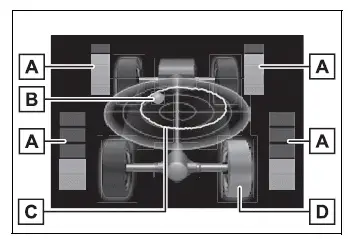
- Torque distribution display
Shows the current drive status of each wheel using 6 indication levels, ranging from 0 to 5. This provides a visual representation of how driving force is being distributed. - G-force display*
Indicates the magnitude and direction of the G-force acting on the vehicle. Changes are represented by the movement and position of the ball within the display. - Maximum G-force course*
This item operates together with the G-force display and shows the recorded path of the ball during previous vehicle movement.Press and hold
 to clear the stored record and begin a new measurement.
 - Wheel spin display
If a tire begins spinning, the corresponding wheel icon changes color and flashes, helping the driver identify which wheel is affected.
*: This information is available only when the driving mode is set to Sport mode.
The illustration is provided as an example. The arrangement, appearance, or details shown on the actual multi-information display may differ depending on the Toyota RAV4 configuration and current operating conditions.
Settings display Toyota RAV4 XA50
Vehicle functions and the information shown on the screen can be configured with the meter control switches. These options allow the driver to adjust selected Toyota RAV4 assistance, warning, and convenience features from the multi-information display.
■ Setting procedure
1. Operate  or
or  on the meter control switches, and then select
  .
.
2. Operate  or
or  on the meter control switches to highlight and select the item you want to configure.
- When a function can be switched on or off, or a setting such as volume can be changed directly from the screen, each press of
 applies the next available setting or changes the current selection.
 - For functions that offer additional operating options, display preferences, or selectable values, press and hold
 to open the detailed settings screen. After the screen appears, use
  to choose the desired setting or value, such as a time adjustment.
3. After completing the changes, press  on the meter control switches to return to the previous screen.
■  LTA (Lane Tracing Assist)
Select this menu to configure the following Lane Tracing Assist options for the Toyota RAV4.
- "Lane Center"
Select to enable or disable the lane centering function.
- "Sensitivity"
Select to adjust the sensitivity of the lane departure alert.
- "Sway Warning"
Select to enable or disable the vehicle sway warning.
- "Sway Sensitivity"
Select to adjust the sensitivity of the vehicle sway warning according to the available setting levels.
■  PCS (Pre-Collision System)
Select this menu to configure the following Pre-Collision System options.
- PCS on/off
Select to enable or disable the pre-collision system.
- "Warning timing"
Select to change the timing of the pre-collision warning from the available settings.
■ BSM (Blind Spot Monitor) (if equipped)
Select this menu to configure the following Blind Spot Monitor options.
- BSM (Blind Spot Monitor) on/off
Select to enable or disable the BSM system.
- "Brightness"
Select to change the brightness of the BSM indicators located in the outside rear-view mirrors.
- "Sensitivity"
Select to adjust the alert timing used when the system detects an approaching vehicle.
■  (Intuitive parking assist) (if equipped)
Select this menu to configure the following intuitive parking assist options.
- Intuitive parking assist on/off
Select to enable or disable the intuitive parking assist function.
- "Volume"
Select to adjust the volume of the buzzer that sounds while intuitive parking assist is operating.
■ RCTA (Rear Cross Traffic Alert) (if equipped)
Select this menu to manage the available Rear Cross Traffic Alert settings.
- RCTA (Rear Cross Traffic Alert) on/off
Select to enable or disable the RCTA system.
- "Volume"
Select to adjust the volume of the RCTA warning buzzer.
■  PKSB (Parking Support Brake System) (if equipped)
Select to enable or disable the Parking Support Brake function according to the driver's preferred Toyota RAV4 assistance settings.
■  RSA (Road Sign Assist) (if equipped)
Select this menu to configure the following Road Sign Assist options.
- Road Sign Assist on/off
Select to enable or disable the RSA system.
- "Notification method"
Select to change how the driver is notified when the system recognizes excessive vehicle speed or a Do Not Enter sign.
- "Notification Level"
Select to adjust the notification level used when the system recognizes a speed limit sign.
■  Vehicle Settings
 PBD (Power Back Door) (if equipped)
Select this menu to configure the following Power Back Door functions.
- System settings
Select to enable or disable the power back door system.
- "Hands Free"*
Select to enable or disable the Hands Free Power Back Door function.
- "Opening Adjustment"
Select the position at which the power back door stops when it is opened fully, allowing the opening height to be adapted to the available space.
- "Volume"
Select to adjust the volume of the buzzer that sounds while the power back door system is operating.
*: Vehicles equipped with the Hands Free Power Back Door.
 (Stop & Start system) (if equipped)
Select to adjust how long the Stop & Start system remains active while the "A/C" switch of the air conditioning system is on.
- "TPWS" (Tire Pressure Warning System) (if equipped)
"Set Pressure"
Select to initialize the tire pressure warning system after the required tire pressure adjustments have been completed.
- "Change Wheel"
Select to register the identification codes of the tire pressure sensors with the tire pressure warning system after a wheel-related change.
- "Rear Seat Reminder"
Select to enable or disable the rear seat reminder function.
- "Scheduled Maintenance"
After all required maintenance has been completed, select this item to reset the scheduled maintenance information, including the maintenance reminder message and the displayed distance remaining until the next service interval.
■  Settings
- "Language"
Select to change the language used on the Toyota RAV4 multi-information display.
- "Units"
Select to change the displayed units of measurement.
- "Meter Type"
Select to change the speedometer presentation to the preferred available display type.
 (Eco Driving Indicator Light)
Select to activate or deactivate the Eco Driving Indicator Light.
 (Driving information display settings)
Select to change the information and presentation used on the Fuel Economy display.
 (Audio settings) (if equipped)
Select to enable or disable the  screen on the multi-information display.
 (Vehicle information display settings)
"Display Contents"
Select to enable or disable the AWD system display on AWD-equipped Toyota RAV4 models.
- "Drive Info Type"
Select whether the drive information screen presents values for the current trip or accumulated totals recorded between manual resets.
- "Drive Info Items"
Select which two items appear in the upper and lower sections of the drive information screen. The available choices are average speed, distance, and total elapsed time, allowing the display to prioritize the information most useful to the driver.
- "Pop-Up Display"
Select to enable or disable the following pop-up notifications, which may appear automatically when the corresponding Toyota RAV4 function is used or relevant information becomes available.
- Intersection guidance from the navigation system-linked display (if equipped)
- Incoming call information from the hands-free phone system (if equipped)
- Audio operation information (if equipped)
- Volume adjustment information (if equipped)
- Voice control information (if equipped)
- Stop & Start system operating duration (if equipped)
- Stop & Start system status (if equipped)
"MID OFF"
Select this item to turn off the displayed information and show a blank multi-information screen.
"Default Settings"
Select to restore the meter display settings to their original default configuration.
■ Suspension of the settings display
- Operation of the settings display is temporarily suspended under the following conditions:
- When a warning message appears on the multi-information display
- When the vehicle begins to move
- Settings for functions that are not installed on the vehicle do not appear in the menu.
- When a function is disabled, the related adjustment options for that function cannot be selected.
WARNING
■ Cautions during setting up the display
Because the engine must remain running while certain display settings are being configured, make sure the Toyota RAV4 is parked in an open or adequately ventilated location.
In an enclosed space, such as a garage, exhaust gases containing harmful carbon monoxide (CO) can accumulate and enter the passenger compartment.
Exposure to accumulated exhaust gas may result in death or a serious health hazard.
NOTICE
■ During setting up the display
To prevent the battery from becoming discharged, keep the engine running while configuring display functions that require an extended amount of time.
Warning message display
Select this screen to review warning messages and the recommended actions to take when a malfunction or condition requiring attention is detected.
Convenience Services (Suggestion function)
This function presents useful suggestions to the driver when specific vehicle conditions are detected.
When a suggestion appears, use the meter control switches to select the desired response without navigating away from the message.
■ Suggestion to turn off the headlights
If the headlights remain illuminated for a certain period after the engine switch has been turned off, the multi-information display may show a suggestion message.
When the headlight switch is in the AUTO position, a message appears asking whether you want to switch off the headlights.
To turn the headlights off, select "Yes" using the meter control switches.
If the driver's door is opened after the Toyota RAV4 engine switch is turned off, this suggestion message will not be displayed.
■ Customization
The Convenience Services suggestion function can be enabled or disabled through the available multi-information display settings.