
Toyota RAV4: Vehicle status information and indicators - Gauges and meters (with 12.3-inch multi-information display)
The gauges and meters provide the driver with essential information about vehicle speed, engine operation, fuel level, mileage, driving range, and the current status of various Toyota RAV4 functions.
Meter display
■ Locations of gauges and meters
The meter layout can be changed through  on the multi-information display, allowing the driver to select the preferred arrangement of gauges and vehicle information.
Type 1/Type 2
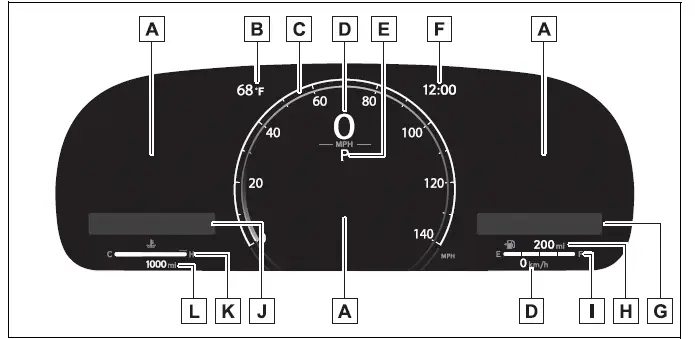
The measurement units and certain display details may vary according to the market for which the vehicle was produced.
- Multi-information display
Presents a wide range of driving data and vehicle status information to the driver.
It also shows warning messages when a malfunction or condition requiring attention is detected. - Outside temperature
Displays the measured ambient temperature outside the vehicle. - Analog meter (Type 2 only)
The dial design of the analog meter can be changed through on the multi-information display.
Tachometer:
Shows the engine speed in revolutions per minute.
Analog speedometer:
Indicates the current vehicle speed using a conventional dial-style layout. - Digital speedometer
Displays the current Toyota RAV4 vehicle speed in a clear numerical format. - Shift position and shift range
Shows the currently selected shift position or active shift range. - Clock
Automatically adjusts the displayed time by using GPS time information when the GPS clock function is available.
For operating details and related settings, refer to the "MULTIMEDIA OWNER'S MANUAL". - Widget (Audio system-linked display)
Shows the selected audio source or track information directly on the meter.
When a contents list is open on the multi-information display, this widget is temporarily hidden to provide space for the selected menu information. - Distance to empty
Shows the estimated distance the vehicle can travel using the fuel currently remaining in the tank. - Fuel gauge
Indicates the approximate quantity of fuel remaining in the tank.
Under the following conditions, the displayed fuel level may not immediately correspond to the actual amount of fuel in the tank. Refer to P.91 if the Toyota RAV4 fuel gauge does not show the remaining quantity correctly.- Only a small amount of fuel has been added.
- Fuel is added while the gauge is near or already at "F".
- The vehicle is stopped on an uneven surface, including an incline or slope.
- The vehicle is traveling on a slope or around a curve.
- Widget (Fuel Economy)
Presents current fuel economy information in the meter display.
If a contents list is being shown on the multi-information display, the fuel economy widget will not appear until that list is closed. - Engine coolant temperature gauge
Displays the engine coolant temperature so the driver can monitor the engine's operating condition. - Odometer and trip meter display
Provides access to the vehicle's accumulated mileage and independently recorded trip distances.
Type 3
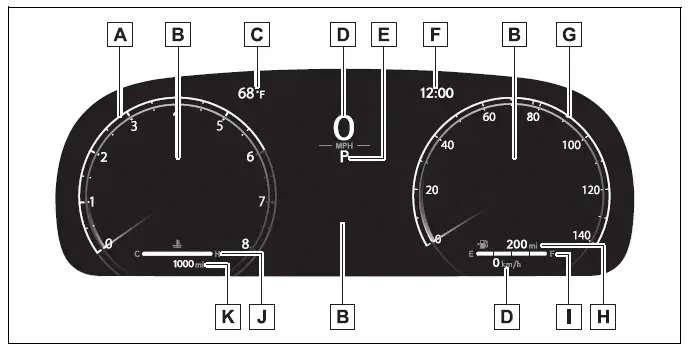
- Tachometer
Displays the engine speed in revolutions per minute, helping the driver monitor the current engine operating rate. - Multi-information display
Provides various forms of driving data and vehicle status information.
It also presents warning messages if a malfunction or relevant operating condition is detected. - Outside temperature
Shows the detected ambient temperature outside the vehicle. - Digital speedometer
Presents the current vehicle speed in a prominent numerical format. - Shift position and shift range
Identifies the selected shift position or active shift range so it can be checked at a glance. - Clock
Uses GPS time information to adjust the displayed time automatically when the GPS clock function is active.
For additional details, refer to the "MULTIMEDIA OWNER'S MANUAL". - Analog speedometer
Displays the Toyota RAV4 vehicle speed using a traditional dial-style presentation. - Distance to empty
Indicates the estimated driving distance available with the fuel remaining in the tank. - Fuel gauge
Shows the approximate amount of fuel currently remaining in the tank.
The indicated level may temporarily differ from the actual fuel quantity under the conditions listed below.- A limited amount of fuel is added.
- The tank is refueled while the gauge is close to or already indicates "F".
- The vehicle is parked on an uneven or inclined surface.
- The vehicle is driven uphill, downhill, or through a curve.
- Engine coolant temperature gauge
Shows the engine coolant temperature and allows changes in operating temperature to be monitored. - Odometer and trip meter display
Displays the total distance traveled and the mileage recorded by the selectable trip meters.
■ The meters and display illuminate when
The meters and multi-information display illuminate when the engine switch is turned to ON, allowing the driver to review essential Toyota RAV4 operating information before and during the journey.
■ Distance to empty
- The distance-to-empty value is calculated using the vehicle's average fuel consumption.
Because fuel usage changes with driving conditions and operating habits, the actual distance the Toyota RAV4 can travel may differ from the estimate shown on the display.
- If only a small quantity of fuel is added, the displayed range may not update immediately. Turn the engine switch off before refueling. When fuel is added while the engine switch remains on, the system may not correctly recognize the change in fuel level.
- When "Refuel" appears, the remaining fuel level is low and the system can no longer calculate a reliable driving range. Refuel the vehicle as soon as possible.
■ Manually updating the fuel gauge and possible driving range
The fuel gauge and possible driving range are calculated together. If neither reading updates after a small amount of fuel has been added, both displays can be refreshed manually by completing the following procedure.
1. Stop the Toyota RAV4 on a level surface and keep the vehicle stationary.
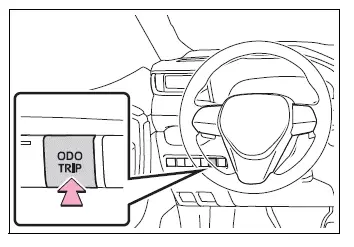
2. Press the "ODO TRIP" switch until the odometer, rather than trip meter A or trip meter B, is shown.
3. Turn the engine switch off.
4. Press and hold the "ODO TRIP" switch, and then turn the engine switch to ON without releasing the switch.
5. Continue holding the "ODO TRIP" switch for approximately 5 seconds. Release it when the odometer begins to flash.
The update is complete after the odometer flashes for approximately 5 seconds and the display automatically returns to its normal operating state.
■ Outside temperature display
- The display shows the detected outside temperature within a range of -40°F (-40°C) to 122°F (50°C).
- When the outside temperature is approximately 37°F (3°C) or lower, the indicator
 flashes for approximately 10 seconds and then remains illuminated to draw attention to the cold conditions.
 - Under the following circumstances, the displayed temperature may not accurately represent the current outside temperature, or the reading may require more time than usual to change:
- When the vehicle is stopped or traveling at less than 12 mph (20 km/h).
- When the outside temperature changes suddenly, such as when entering or leaving a garage, tunnel, or another enclosed area.
- If "--" or "E" appears, the outside temperature monitoring function may have a malfunction.
Have your vehicle inspected by your Toyota dealer.
■ Free/Open Source Software Information
This product incorporates Free/Open Source Software (FOSS). The applicable license information and, where provided, the source code  for this software can be accessed through the following URL.
https://www.denso.com/global/en/opensource/meter/toyota/
■ Customization
The gauges and meters can be customized through the corresponding settings on the multi-information display, allowing the driver to adjust selected display elements and information layouts to suit personal preferences.
WARNING
■ The information display at low temperatures
Allow the interior of the Toyota RAV4 to warm up before relying on the liquid crystal information display. In extremely low temperatures, the monitor may respond more slowly than normal, and changes in the displayed information can be delayed.
For example, there may be a brief delay between the driver's shift operation and the appearance of the new gear number on the display. If the driver assumes the shift was not completed and downshifts again, rapid and excessive engine braking may occur. This could contribute to a loss of vehicle control and an accident resulting in death or serious injury.
NOTICE
■ To prevent damage to the engine and its components
- Do not allow the tachometer needle to enter the red zone, as this area indicates the maximum engine speed. Operating the engine in this range may cause damage to the engine or related components.
- The engine may be overheating if the engine coolant temperature gauge reaches the red zone marked "H". If this occurs, immediately stop the Toyota RAV4 in a safe location and inspect the engine only after it has cooled completely.
Odometer and trip meter display
■ Display items
- Odometer
Displays the total accumulated distance the vehicle has traveled throughout its operation.
- Trip meter A/trip meter B
Displays the distance traveled since the selected trip meter was last reset. Trip meters A and B function independently, allowing the driver to record and compare two separate journeys or mileage intervals.
■ Changing the display
Each time the "ODO TRIP" switch is pressed, the display cycles to the next available item, including the odometer, trip meter A, and trip meter B.
When either trip meter is displayed, press and hold the switch to reset the selected trip reading to zero.
Changing the instrument panel light brightness
The brightness of the instrument panel lights can be adjusted to improve gauge visibility and reduce glare under different driving conditions.
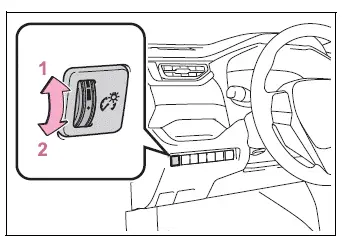
- Brighter
- Darker
■ Brightness of the meter lights (day mode and night mode)
The meter illumination levels for day mode and night mode can be adjusted independently, allowing the instrument panel to remain clear and comfortable to view in changing light conditions.
The Toyota RAV4 meters switch between day mode and night mode under the following conditions:
- Day mode: When the tail lights are off, or when the tail lights are on while the surrounding area remains bright.
- Night mode: When the tail lights are on and the surrounding area is dark.