
Toyota RAV4: Before driving - Key information
Keys
The Toyota RAV4 is supplied with the keys and identification plate described below. The exact key configuration depends on whether the vehicle is equipped with the smart key system.
Vehicles without smart key system
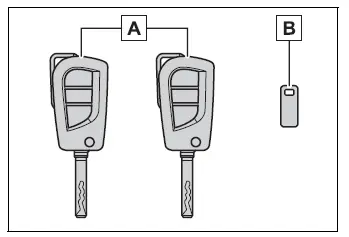
- Master keys
Used to start and operate the vehicle and to control the wireless remote control functions. - Key number plate
Shows the identification number associated with the supplied keys.
Vehicles with smart key system
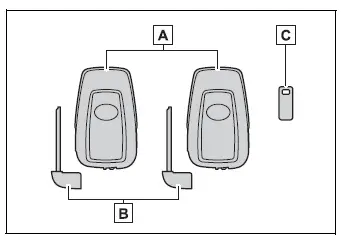
- Electronic keys
- Operate the smart key system.
- Control the wireless remote functions.
- Mechanical keys
Provide access to supported mechanical lock functions when the electronic key cannot be used normally. - Key number plate
Contains the key identification number that may be required when obtaining a replacement key.
■ When riding in an aircraft
When carrying a key with a wireless remote control function onto an aircraft, do not press any of its buttons while inside the cabin. If the key is stored in a bag, pocket, or other container, position it so the buttons cannot be pressed accidentally. Activating a button may cause the key to transmit radio waves that could interfere with aircraft equipment.
■ Key battery depletion
Vehicles without smart key system
- The typical key battery life is approximately 1 to 2 years.
- The battery gradually loses power even when the wireless key is not being used. The following conditions may indicate that the battery is becoming depleted and should be replaced:
- The wireless remote control no longer operates reliably or does not operate at all.
- The effective operating range becomes noticeably shorter.
Vehicles with smart key system
- The typical electronic key battery life is approximately 1 to 2 years.
- When the battery becomes weak, an alarm may sound inside the cabin and a message may appear on the multi-information display after the engine is stopped.
- If the electronic key will not be used for an extended period, activate battery-saving mode to reduce unnecessary battery consumption.
- Because the electronic key continually receives radio signals, its battery will gradually discharge even when the key is not actively used. Replace the battery when any of the following symptoms appear:
- The smart key system or wireless remote control operates intermittently or stops functioning.
- The area in which the Toyota RAV4 detects the electronic key becomes smaller.
- The LED indicator on the surface of the key does not illuminate when expected.
The key battery can be replaced by the vehicle owner. However, incorrect handling may damage the electronic key or its internal components, so having the replacement performed by a Toyota dealer is recommended.
- To prevent accelerated battery depletion or reduced key performance, do not leave the electronic key within 3 ft. (1 m) of electrical equipment that produces a magnetic field, including:
- Televisions
- Personal computers
- Cellular phones, cordless phones, and battery chargers
- Table lamps
- Induction cookers
■ If a message regarding the state of the electronic key or engine switch mode, etc. is shown (vehicles with smart key system)
The multi-information display may show a message asking the driver to confirm the location of the electronic key or the current engine switch mode. These notifications help prevent situations such as locking the key inside the Toyota RAV4, leaving the vehicle with the engine switch not set to OFF, or allowing another passenger to carry the key away unintentionally. Read the displayed message carefully and take the requested action before leaving or locking the vehicle.
In any of these situations, read the message carefully and follow the instructions shown on the multi-information display without delay.
■ If "Key Battery Low Replace Key Battery" is displayed on the multi-information display (vehicles with smart key system)
The electronic key battery is running low and should be replaced as soon as possible to maintain reliable operation of the Toyota RAV4 smart key and wireless remote control functions.
■ Confirmation of the registered key number
The number of electronic keys currently registered to the vehicle can be confirmed.
Contact your Toyota dealer for details about checking the registered key count.
■ If "A New Key has been Registered Contact Your Dealer for Details" is displayed on the multi-information display (vehicles with smart key system)
For approximately 10 days after a new electronic key has been registered, this message appears each time the driver's door is opened after the vehicle has been unlocked from the outside.
If the message appears even though you have not requested or authorized the registration of a new electronic key, contact your Toyota dealer. Ask the dealer to verify whether an unknown electronic key, other than the keys in your possession, has been registered to the Toyota RAV4.
NOTICE
■ To prevent key damage
- Do not drop the keys, bend them, or expose them to strong impacts or other rough handling.
- Do not leave the keys exposed to high temperatures for extended periods.
- Do not allow the keys to become wet or clean them in an ultrasonic washer or similar device.
- Do not attach metallic or magnetic objects to the keys, and do not store the keys close to such materials.
- Do not disassemble the keys or attempt to modify their internal components.
- Do not attach stickers, labels, or other objects to the surface of the keys, as they may interfere with normal operation.
- Do not place the keys near devices that generate magnetic fields, including televisions, audio equipment, and induction cookers.
- Keep the keys away from medical electrical equipment, including low-frequency and microwave therapy devices. Do not undergo treatment with this type of equipment while carrying the keys.
■ Carrying the electronic key on your person (vehicles with smart key system)
Keep the electronic key at least 3.9 in. (10 cm) away from electrical appliances that are switched on.
Radio waves emitted by an operating electrical appliance within 3.9 in. (10 cm) of the electronic key may interfere with communication between the key and the vehicle. As a result, the Toyota RAV4 may not detect the key or the key may not function correctly.
Wireless remote control
The supplied keys include the following wireless remote control functions. The available buttons depend on whether the Toyota RAV4 is equipped with the smart key system and other optional equipment.
Vehicles without smart key system
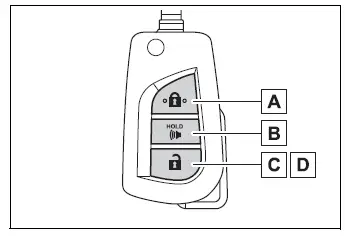
- Locks all doors
- Sounds the vehicle alarm
- Unlocks all doors
- Opens the side windows*
*: This function must be enabled through customization performed by your Toyota dealer.
Vehicles with smart key system
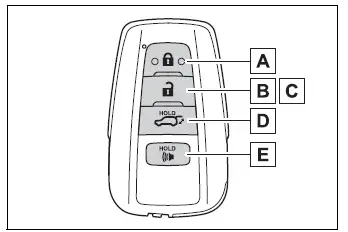
- Locks all doors
- Unlocks all doors
- Opens the side windows*1 and the moon roof*1, 2 or panoramic moon roof*1, 2
- Opens and closes the power back door*2
- Sounds the vehicle alarm
*1: These functions must be enabled through customization performed by your Toyota dealer.
*2: If equipped.
■ Theft deterrent panic mode
Vehicles without smart key system
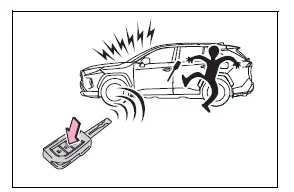
Press and hold  for longer than approximately 1 second. The alarm will sound intermittently and the exterior lights will flash, helping discourage anyone attempting to break into, damage, or interfere with the Toyota RAV4.
To stop the panic alarm, press any button on the key.
Vehicles with smart key system
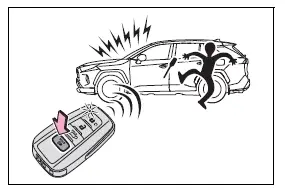
Press and hold  for longer than approximately 1 second. The alarm will sound intermittently and the vehicle lights will flash to attract attention and deter a person attempting to enter or damage the vehicle.
To stop the alarm, press any button on the electronic key.
■ Conditions affecting operation
Vehicles without smart key system
The wireless remote control may not operate normally when radio communication is weakened, blocked, or affected by electrical interference. This can occur in the following situations:
- When the wireless key battery is depleted or has become too weak for reliable operation
- Near a television tower, electric power plant, gas station, radio station, large electronic display, airport, or another location that produces strong radio waves or electrical noise
- When carrying a portable radio, cellular phone, or another wireless communication device close to the key
- When the wireless key is touching a metallic object or is covered by metallic material
- When another wireless key or radio-transmitting device is being used nearby
- When metallic window tint or other metallic objects are attached to the rear window
Using the master key (vehicles without smart key system)
- Releasing
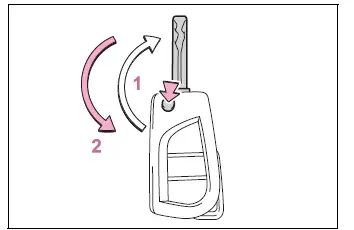
Press the button to release the key blade from its folded position. Make sure the blade is fully extended before inserting it into a lock or the engine switch. - Folding
To return the key blade to its case, press and hold the button while carefully pushing the blade back into the stowed position.
Using the mechanical key (vehicles with smart key system)
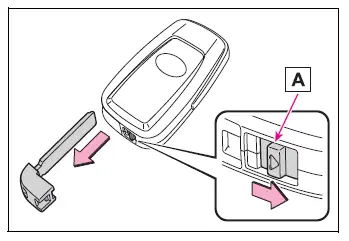
To remove the mechanical key, slide release lever A and pull the key out of the electronic key housing.
Because the mechanical key has grooves on only one side, it can be inserted into the lock cylinder in only one direction. If it does not enter smoothly, do not force it. Turn the key over and try inserting it again.
After using the mechanical key, return it securely to the electronic key housing. Always carry both parts together, as the mechanical key may be required if the electronic key battery is depleted or the smart entry function does not operate correctly.
■ When required to leave the vehicle's key with a parking attendant
Lock the glove box when necessary to protect any personal items stored inside.
Remove the mechanical key and keep it with you, then provide the parking attendant with the electronic key only. This allows the Toyota RAV4 to be moved while limiting access to the locked glove box.
■ If a wrong key is used
If an incorrect key is inserted, the lock cylinder rotates freely without engaging the internal locking mechanism. This design helps isolate and protect the components inside the cylinder.