
Toyota RAV4: Vehicle status information and indicators - Fuel consumption information
Fuel consumption information can be viewed on the Multimedia Display, allowing the driver to review current efficiency, recent performance, and recorded consumption data for the Toyota RAV4.
Display procedure
Press  on the main menu, and then select "Trip information" from the submenu.
For detailed instructions on operating the Multimedia Display and its available menus, refer to the "MULTIMEDIA OWNER'S MANUAL".
■ Current fuel consumption screen
If another trip information screen is currently shown, press "Current" to open the current fuel consumption screen.
Use the displayed average fuel consumption figures as general reference values, since actual fuel economy can vary with driving style, traffic, road, weather, and vehicle operating conditions.
The layout and appearance of certain screen elements may differ depending on the type of multimedia system installed in the Toyota RAV4.
The illustration is provided as an example and may differ slightly from the information or values shown under actual driving conditions.
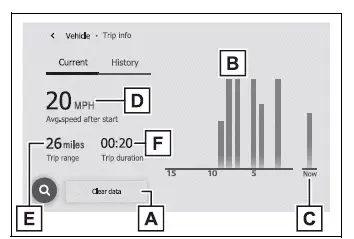
- Consumption data reset control
Clears the fuel consumption information currently recorded on this screen. - Fuel consumption during the previous 15 minutes
Shows recent fuel economy data over the displayed time period. - Current fuel consumption
Indicates fuel consumption based on the vehicle's present operating conditions. - Average vehicle speed since the engine was started
Displays the average speed calculated during the current driving period. - Trip range
Shows the estimated distance that can be traveled with the fuel remaining in the tank. - Elapsed time since the engine was started
Displays the length of time recorded for the current driving period.
■ History screen
If a different fuel consumption screen is displayed, press "History" to open the recorded fuel economy history.
Treat the displayed average fuel consumption as a reference rather than a guaranteed result, as actual consumption can change between journeys.
Some screen layouts, labels, and controls may vary according to the multimedia system fitted to the vehicle.
The illustration is intended for explanation and may not exactly match the data or arrangement shown on the actual display.
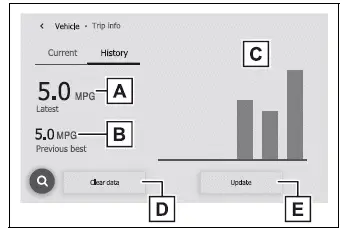
- Latest fuel consumption
Shows the most recently recorded fuel economy result. - Best recorded fuel consumption
Displays the highest fuel economy value stored in the history. - Previous fuel consumption record
Shows earlier recorded consumption data for comparison. - History data reset control
Deletes the stored fuel consumption history. - Latest fuel consumption update control
Records and displays a newly measured fuel consumption result.
■ Updating the history data
Press "Update" to measure the current fuel consumption again and replace the latest record with newly calculated Toyota RAV4 fuel economy data.
■ Resetting the data
Press "Clear data" to delete the stored fuel consumption information. Once cleared, the previous values will no longer be available for comparison.
■ Trip range
The trip range indicates the estimated maximum distance the vehicle can travel using the quantity of fuel currently remaining in the tank.
This estimate is calculated from average fuel consumption. Because driving conditions and fuel usage can change, the actual distance that can be traveled may differ from the value displayed.