
Toyota RAV4: Driving - Driving procedures
Engine (ignition) switch (vehicles without smart key system) Toyota RAV4 (XA50)
Starting the engine
1. Pull the parking brake switch and confirm that the parking brake is securely applied. The parking brake indicator will illuminate when the parking brake has been set.
2. Check that the shift lever is securely positioned in P.
3. Firmly depress and hold the brake pedal.
4. Turn the engine switch to START to crank and start the engine. Release the key after the engine starts.
■ If the engine does not start
The engine immobilizer system may not have been deactivated correctly. If the Toyota RAV4 engine does not start after following the proper procedure, contact your Toyota dealer for inspection and assistance.
■ When the steering lock cannot be released
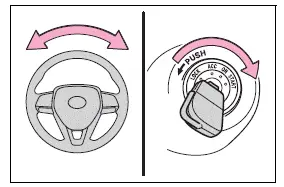
When attempting to start the engine, the engine switch may appear to be stuck in OFF because pressure is being applied to the steering lock. To release it, gently turn the key while moving the steering wheel slightly to the left and right.
WARNING
■ When starting the engine
Always start the engine while seated correctly in the driver’s seat. Never depress the accelerator pedal while starting the engine under any circumstances.
Starting the vehicle from an improper position or pressing the accelerator may cause unexpected vehicle movement and result in an accident, death, or serious injury.
NOTICE
■ When starting the engine
- Do not crank the engine continuously for more than 30 seconds at a time.
Extended cranking may overheat and damage the starter motor or associated wiring.
- Do not race or operate a cold engine at unnecessarily high speed immediately after starting it.
- If the engine becomes difficult to start, starts irregularly, or stalls frequently, have the Toyota RAV4 inspected by your Toyota dealer as soon as possible.
Changing the engine switch positions
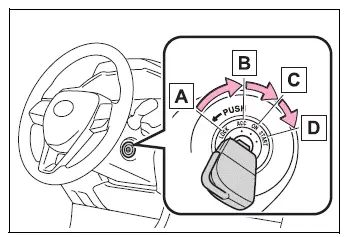
- OFF ("LOCK" position)
The steering wheel is locked and the key can be removed. The key can be removed only when the shift lever is in P. - ACC ("ACC" position)
Certain electrical components, including the audio system, can be operated without starting the engine. - ON ("ON" position)
All electrical components are available for use, and the vehicle systems are prepared for engine operation. - START ("START" position)
This position is used to crank and start the engine.
■ Turning the key from ACC to OFF
- Move the shift lever securely to P.
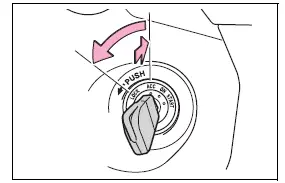
- Push the key inward and turn it from ACC to OFF. Confirm that the switch reaches the LOCK position before removing the key.
■ Key reminder function
If the driver’s door is opened while the engine switch remains in OFF or ACC, a buzzer sounds to remind the driver to remove the key from the ignition switch before leaving the Toyota RAV4.
WARNING
■ Caution when driving
Never turn the engine switch to OFF during normal driving. If an emergency makes it necessary to stop the engine while the vehicle is moving, turn the engine switch only to ACC.
Stopping the engine while driving reduces power assistance for the steering and brakes, making the vehicle more difficult to control and potentially causing a serious accident.
NOTICE
■ To prevent battery discharge
Do not leave the engine switch in ACC or ON for an extended period while the engine is not running. Electrical components may continue drawing power and discharge the Toyota RAV4 battery.
Engine (ignition) switch (vehicles with smart key system) Toyota RAV4 compact crossover
When the electronic key is carried by the driver, the engine switch can be used to start the engine or change the operating mode. Follow the correct procedure and confirm each condition before attempting to start the Toyota RAV4.
Starting the engine
1. Pull the parking brake switch and confirm that the parking brake is securely applied. The parking brake indicator will illuminate when the brake has been set correctly.
2. Check that the shift lever is securely positioned in P.
3. Firmly depress and continue holding the brake pedal.
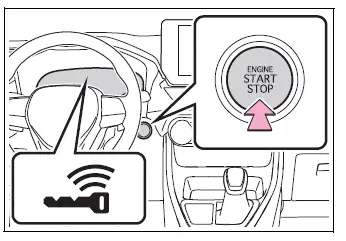
 and a corresponding message will appear on the multi-information display.
If the indicator and message are not displayed, the engine cannot be started. Confirm that the brake pedal is being pressed firmly and that the electronic key is inside the vehicle.
4. Press the engine switch once with a short, firm action.
Only one brief and deliberate press of the engine switch is required. Do not press and hold the switch while waiting for the engine to start.
The starter will continue cranking until the engine starts or for a maximum of 30 seconds, whichever occurs first.
Keep the brake pedal firmly depressed until the engine has started completely and normal operation is confirmed.
The Toyota RAV4 engine can be started from any engine switch mode when all required starting conditions are satisfied.
■ If the engine does not start
- The engine immobilizer system may not have been deactivated correctly.
If the engine still does not start after the proper procedure has been followed, contact your Toyota dealer.
- If a start-up message appears on the multi-information display, read it carefully and follow the instructions shown before attempting to start the engine again.
- If the door was unlocked using the mechanical key, the engine cannot be started through the normal smart key system procedure. However, if the electronic key is carried inside the vehicle and the doors are locked, the engine can be started.
■ If the battery is discharged
The engine cannot be started using the normal smart key system procedure when the vehicle battery is discharged. The electrical system must have sufficient power to recognize the electronic key and operate the starter.
■ If there is a malfunction in the smart key system
If “Smart Key System Malfunction” appears on the multi-information display, the smart key system may not be operating correctly.
Have the Toyota RAV4 inspected by your Toyota dealer immediately. Do not ignore the warning, even if the engine can still be started or the doors continue to operate normally.
■ Operation of the engine switch
- If the engine switch is not pressed briefly and firmly, the operating mode may fail to change or the engine may not start. Release the switch and press it again correctly.
- If you attempt to restart the engine immediately after turning the engine switch to OFF, the engine may not start in some situations. Wait a few seconds after switching the vehicle off before pressing the engine switch again.
WARNING
■ When starting the engine
Always start the engine while seated correctly in the driver’s seat. Never depress the accelerator pedal while starting the engine under any circumstances.
Starting the Toyota RAV4 from outside the proper driving position or pressing the accelerator during start-up may cause unexpected vehicle movement and result in an accident, death, or serious injury.
NOTICE
■ When starting the engine
- Do not race a cold engine. Allow it to begin operating normally before applying heavy acceleration or placing it under a significant load.
- If the engine becomes difficult to start, starts irregularly, or stalls frequently, have the vehicle inspected by your Toyota dealer immediately.
■ Symptoms indicating a malfunction with the engine switch
If the engine switch operates differently from normal, requires unusual pressure, sticks slightly, or does not respond consistently, there may be a malfunction. Contact your Toyota dealer promptly and have the switch inspected before the condition becomes more serious.
Stopping the engine
1. Bring the Toyota RAV4 to a complete stop in a safe location.
2. If the parking brake is operating in manual mode, apply the parking brake and confirm that the parking brake indicator is illuminated.
3. Move the shift lever to the P position.
4. Press the engine switch once with a short, firm press.
The engine will stop, and the meter display will turn off.
5. Release the brake pedal, then check the multi-information display to make sure that neither "ACCESSORY" nor "IGNITION ON" is shown. This confirms that the Toyota RAV4 has been switched off correctly.
■ Automatic engine shut off feature
- The vehicle is equipped with an automatic engine shut-off feature that stops the engine when it has been left running for an extended period while the shift lever remains in P.
- If the engine is left running with the shift lever in P, it will automatically shut off after approximately 1 hour.
- The automatic engine shut-off timer will reset when the brake pedal is depressed or when the shift lever is moved to any position other than P.
- After the vehicle has been parked, the automatic engine shut-off feature will be disabled if a door is locked using the interior door lock switch or if the vehicle is locked from outside with the mechanical key.
The timer for the automatic engine shut-off feature will be enabled again when the driver's door is opened.
WARNING
■ Stopping the engine in an emergency
- If it becomes necessary to stop the engine during an emergency while the vehicle is moving, press and hold the engine switch for more than 2 seconds, or press the switch briefly 3 or more times in rapid succession.
Do not operate the engine switch while driving unless an actual emergency requires the engine to be stopped. Switching off the engine while the vehicle is moving will not immediately eliminate steering or braking control, but the power assistance for these systems will be lost. As a result, steering and braking will require significantly more effort. Move to the side of the road and stop the vehicle as soon as conditions allow you to do so safely.
- If the engine switch is operated while the vehicle is moving, a warning message will appear on the multi-information display and a buzzer will sound to alert the driver.
- To restart the engine after an emergency shutdown, move the shift lever to N, then press the engine switch once with a short, firm press.
■ When parking
Vehicle exhaust contains harmful carbon monoxide (CO), a colorless and odorless gas. Carefully observe the following precautions whenever parking the Toyota RAV4.
Failure to follow these precautions may allow exhaust gases to enter the passenger compartment. Exposure may cause light-headedness, contribute to an accident, or result in death or a serious health hazard.
- Always stop the engine when the vehicle is parked in a poorly ventilated or enclosed location, such as a garage.
- Do not leave the vehicle with the engine running for an extended period. If idling cannot be avoided, park in an open, well-ventilated area and make sure exhaust fumes cannot enter the vehicle interior.
- Do not leave the engine running in an area where snow has accumulated or while heavy snow is falling. If snowbanks form around the vehicle while the engine is operating, exhaust gases may collect around the body and enter the passenger compartment.
Changing engine switch modes Toyota RAV4 2026
The engine switch modes can be changed by pressing the engine switch while the brake pedal is released. Each press advances the switch to the next available mode, allowing the electrical systems of the Toyota RAV4 to be operated without starting the engine.
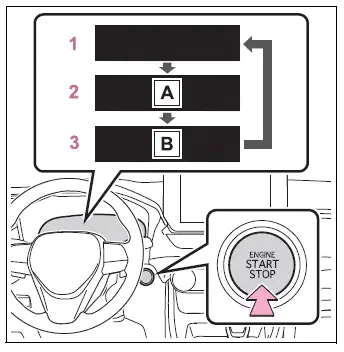
- "ACCESSORY"
- "IGNITION ON"
- OFF*
The emergency flashers remain available for use even when the engine switch is in OFF.The multi-information display will be turned off and no operating mode message will be shown.
- ACC
Certain electrical components, including the audio system, can be operated while the engine is not running."ACCESSORY" will appear on the multi-information display to indicate that the engine switch is in ACC.
- ON
All electrical components can be used in this mode, although prolonged operation without the engine running may discharge the battery."IGNITION ON" will be displayed on the multi-information display while this mode is active.
*: If the engine is turned off while the shift lever is in any position other than P, the engine switch will change to ACC instead of switching completely to OFF.
■ Auto power off function
If the Toyota RAV4 remains in ACC for more than 20 minutes, or in ON for more than 1 hour while the engine is not running and the shift lever is in P, the engine switch will automatically change to OFF. Although this function helps reduce unnecessary electrical consumption, it cannot completely prevent the battery from becoming discharged.
Do not leave the vehicle with the engine switch in ACC or ON for an extended period when the engine is not running, particularly when electrical accessories are being used.
NOTICE
■ To prevent battery discharge
- Do not leave the engine switch in ACC or ON for long periods while the engine is stopped, as the vehicle's electrical components will continue to consume battery power.
- If "ACCESSORY" or "IGNITION ON" remains visible on the multi-information display, the engine switch has not been set to OFF. Before leaving the vehicle, press the engine switch as necessary and confirm that the displayed mode indication has disappeared.
When stopping the engine with the shift lever in a position other than P
If the engine is stopped while the shift lever is in a position other than P, the engine switch will change to ACC rather than OFF. Use the following procedure to place the engine switch in OFF and properly secure the Toyota RAV4 before leaving it:
1. Confirm that the parking brake is securely applied.
2. Move the shift lever to P.
3. Confirm that "ACCESSORY" is shown on the multi-information display, and then press the engine switch once with a short, firm press.
4. Check that neither "ACCESSORY" nor "IGNITION ON" is displayed on the multi-information display, confirming that the engine switch is now in OFF.
NOTICE
■ To prevent battery discharge
Do not stop the engine while the shift lever is in a position other than P. When the engine is stopped in another shift position, the engine switch changes to ACC instead of OFF. Leaving the vehicle in ACC allows electrical power to continue being consumed and may eventually discharge the battery.
Automatic transmission Toyota RAV4
Select the appropriate shift position according to the intended maneuver, current road conditions, and the way the Toyota RAV4 is being driven.
Shift position purpose and functions
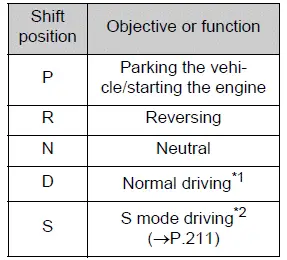
*1: Moving the shift lever to D allows the transmission to automatically select a gear suited to the current driving conditions.
The D position is recommended for normal everyday driving because it provides automatic gear selection without requiring additional driver input.
*2: Selecting individual shift ranges in S mode limits the highest available gear range, adjusts the amount of engine braking, and helps prevent unnecessary upshifting.
■ When driving with dynamic radar cruise control with full-speed range activated
Even if the following operations are performed with the intention of increasing engine braking, additional engine braking will not be applied because dynamic radar cruise control with full-speed range remains active and is not canceled by these actions.
- Downshifting to shift range 7, 6, 5, or 4 while driving in S mode.
- Changing the driving mode to sport mode while the transmission is in D.
■ If "High Transmission Fluid Temp" is displayed on the multi-information display (AWD models)
Return the shift lever to D and reduce the vehicle speed by gradually releasing the accelerator pedal. Stop the Toyota RAV4 in a safe location, move the shift lever to P, and allow the engine to idle until the warning message disappears from the multi-information display.
Once the warning message is no longer displayed, normal driving can be resumed.
If the message remains visible after the vehicle has been allowed to idle for a reasonable period, have the vehicle inspected by your Toyota dealer.
■ AI-SHIFT
AI-SHIFT automatically selects a suitable gear by evaluating the driver's operation of the vehicle together with the current driving conditions.
The AI-SHIFT function operates automatically whenever the shift lever is in D.
Moving the shift lever from D to S cancels AI-SHIFT operation.
WARNING
■ When driving on slippery road surfaces
Do not accelerate abruptly or make sudden gear changes.
Rapid changes in engine braking force may cause the vehicle to lose traction, spin, or skid, potentially resulting in an accident.
Shifting the shift lever
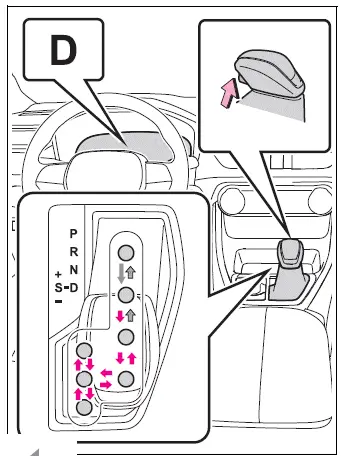
 With the engine switch in ON and the brake pedal depressed*, move the shift lever while pressing the shift release button located on the shift knob.
 Move the shift lever while pressing and holding the shift release button on the shift knob.
 Move the shift lever normally without pressing the shift release button.
Before moving the shift lever between P and D, confirm that the Toyota RAV4 has come to a complete stop. Attempting to change between these positions while the vehicle is moving may place unnecessary stress on the transmission.
*: To move the shift lever out of P, depress the brake pedal before pressing the shift release button. If the shift release button is pressed before the brake pedal, the shift lock mechanism will not release.
■ Shift lock system
The shift lock system is designed to prevent unintended movement of the shift lever when starting or preparing to move the vehicle.
The shift lever can be moved from P only when the engine switch is in ON, the brake pedal is depressed, and the shift release button is pressed.
■ If the shift lever cannot be shifted from P
First, confirm that the brake pedal is being pressed firmly. Also verify that the engine switch is in ON and that the brake pedal was depressed before the shift release button was pushed.
If the shift lever still cannot be moved even though the brake pedal is firmly depressed and the shift release button is pressed, the shift lock system may have a malfunction. Have the Toyota RAV4 inspected by your Toyota dealer as soon as possible.
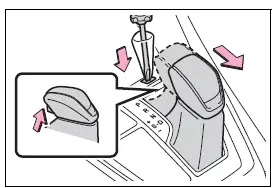
The following procedure can be used only as an emergency measure to release the shift lock and allow the shift lever to be moved.
Releasing the shift lock:
1. Pull the parking brake switch and confirm that the parking brake is securely applied.
2. Turn the engine switch to OFF.
3. Depress and continue holding the brake pedal.
4. Carefully pry up the shift lock override cover using a flathead screwdriver or a similar suitable tool.
To avoid scratching or damaging the cover, wrap the tip of the screwdriver with a soft cloth before inserting it.
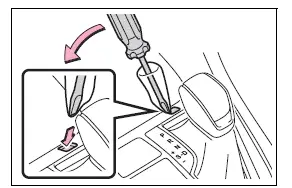
5. Press and hold the shift lock override button, and then press the shift release button on the shift knob.
The shift lever can be moved while both buttons remain pressed. Keep the brake pedal depressed throughout the procedure to prevent unintended vehicle movement.
WARNING
■ To prevent an accident when releasing the shift lock
Before pressing the shift lock override button, securely apply the parking brake and firmly depress the brake pedal.
If the accelerator pedal is pressed by mistake instead of the brake pedal while the shift lock override button is being used and the shift lever is moved out of P, the vehicle may start moving suddenly. This could cause an accident resulting in death or serious injury.
Changing shift ranges in S mode
When the shift lever is placed in S, the driver can manually change the available shift range of the Toyota RAV4 using the following shift lever movements:
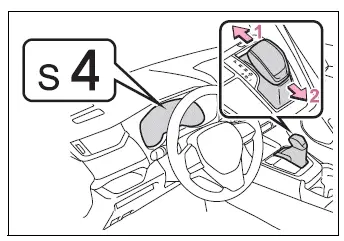
- Upshifting
- Downshifting
The selected shift range, from S1 through S8, is shown on the multi-information display so the driver can confirm the current setting.
When S mode is initially selected, the transmission automatically sets the shift range to 4, 5, or 6 according to the vehicle speed.
However, the initial shift range may be set to 3 when AI-SHIFT has previously operated while the shift lever was in D.
■ S mode
- S mode provides 8 selectable levels of accelerating force and engine braking force, allowing the driver to choose a range suited to the current driving conditions.
- A lower shift range produces stronger acceleration and greater engine braking than a higher shift range. Engine speed will also increase when a lower range is selected.
- To prevent excessive engine speed, the transmission may automatically shift to a higher range even when a lower range has been selected.
- To protect the automatic transmission, the system may automatically select a higher shift range when the transmission fluid temperature becomes high.
- When shift range 7 or lower is selected, holding the shift lever toward "+" changes the selected shift range directly to 8.
■ Downshifting restriction warning buzzer
To maintain safe operation and suitable driving performance, the transmission may restrict a requested downshift under certain conditions. As a result, the selected lower range may not engage even when the shift lever is operated. When the downshift request is restricted, a buzzer will sound twice.
■ If the "S" indicator does not come on or the "D" indicator is displayed even after shifting the shift lever to S
This condition may indicate a malfunction in the automatic transmission system.
Have the Toyota RAV4 inspected by your Toyota dealer immediately. Until the issue is corrected, the transmission will operate in the same manner as it does when the shift lever is in D.
Turn signal lever Toyota RAV4 XA50
Operating instructions
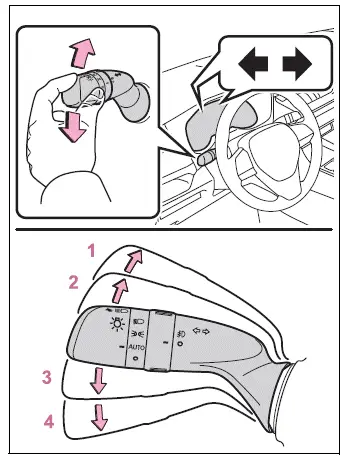
- Move the lever fully upward to signal a right turn.
- For a lane change to the right, move the lever partway upward and release it.
The right turn signals will flash 3 times to indicate the intended lane change. - For a lane change to the left, move the lever partway downward and release it.
The left turn signals will flash 3 times to indicate the intended lane change. - Move the lever fully downward to signal a left turn.
■ Turn signals can be operated when
The turn signals can be used while the engine switch of the Toyota RAV4 is in ON.
■ If the indicator flashes faster than usual
If a turn signal indicator begins flashing more rapidly than normal, check whether a bulb in the front or rear turn signal assembly has burned out.
■ If the turn signals stop flashing before a lane change has been performed
If the 3-flash sequence ends before the Toyota RAV4 has completed the lane change, operate the turn signal lever again to repeat the indication.
■ To discontinue flashing of the turn signals during a lane change
To cancel the flashing sequence before it finishes, briefly operate the lever in the opposite direction. The turn signals will stop flashing once the cancellation input is recognized.
Parking brake Toyota RAV4 fifth generation
The parking brake can be applied or released either automatically or manually, depending on the selected operating mode.
In automatic mode, parking brake operation is linked to movement of the shift lever. The parking brake can still be applied or released manually whenever necessary, even while automatic mode is enabled.
Operating instructions
■ Using the manual mode
The parking brake of the Toyota RAV4 can be applied and released manually by operating the parking brake switch.
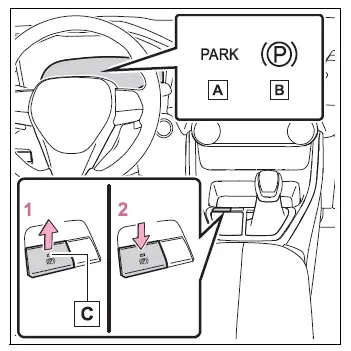
- Parking brake indicator light (U.S.A.)
- Parking brake indicator light (Canada)
- Parking brake switch indicator
1. Pull the parking brake switch to apply the parking brake.
The parking brake indicator light and the indicator on the parking brake switch will illuminate to confirm that the brake has been applied.
If an emergency makes it necessary to operate the parking brake while driving, pull and continue holding the parking brake switch.
2. Press the parking brake switch to release the parking brake.
- Press the parking brake switch while firmly depressing the brake pedal.
- When the automatic release function is available, the parking brake can also be released by depressing the accelerator pedal.
When using this function, depress the accelerator pedal slowly and smoothly to allow the vehicle to begin moving in a controlled manner.
Confirm that both the parking brake indicator light and the parking brake switch indicator have turned off.
If either the parking brake indicator light or the switch indicator flashes, operate the parking brake switch again and check the indicators.
■ Turning the automatic mode on
With the vehicle completely stopped, pull and hold the parking brake switch until a buzzer sounds and a confirmation message appears on the multi-information display.
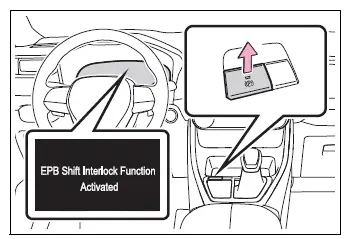
Once automatic mode is enabled, the parking brake operates together with the shift lever as described below.
- When the shift lever is moved out of P, the parking brake is released automatically. The parking brake indicator light and the parking brake switch indicator will turn off.
- When the shift lever is moved to P, the parking brake is applied automatically. The parking brake indicator light and the parking brake switch indicator will illuminate.
Operate the shift lever only after the Toyota RAV4 has stopped and while the brake pedal is firmly depressed.
The automatic function may not operate correctly if the shift lever is moved extremely quickly or if the brake pedal is not pressed firmly enough.
If automatic operation does not occur, apply or release the parking brake manually with the parking brake switch.
■ Turning the automatic mode off
With the vehicle stopped and the brake pedal depressed, press and hold the parking brake switch until a buzzer sounds and a confirmation message is displayed on the multi-information display.
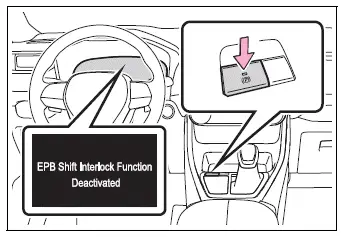
■ Parking brake operation
- When the engine switch is not in ON, the parking brake cannot be released by pressing the parking brake switch.
- When the engine switch is not in ON, automatic mode, including automatic application and release of the parking brake, is unavailable.
■ Parking brake automatic release function
The parking brake can be released automatically by slowly depressing the accelerator pedal when all of the following conditions are satisfied:
- The driver's door is fully closed.
- The driver is wearing the seat belt.
- The shift lever is in a forward driving position or the reverse driving position.
- Neither the malfunction indicator lamp nor the brake system warning light is illuminated.
Before moving the Toyota RAV4, confirm that the parking brake indicators have turned off and that the surrounding area is clear.
Depress the accelerator pedal slowly and smoothly when using the automatic parking brake release function.
If the parking brake does not release when the accelerator pedal is depressed, operate the parking brake switch and release it manually.
When the shift lever is moved out of P, the parking brake will be released automatically if the required operating conditions are satisfied.
■ If "Parking Brake Temporarily Unavailable" is displayed on the multi-information display
If the parking brake is operated repeatedly within a short period, the system may temporarily restrict further operation to protect the components from overheating. When this message appears, stop operating the parking brake and allow the system to rest. Normal operation should return after approximately 1 minute.
■ If "Parking Brake Unavailable" is displayed on the multi-information display
Operate the parking brake switch again. If the message remains displayed after the switch has been operated several times, the parking brake system may have a malfunction.
Have the Toyota RAV4 inspected by your Toyota dealer.
■ Parking brake operation sound
A motor or whirring sound may be heard when the parking brake is applied or released. This is a normal operating sound and does not indicate a malfunction.
■ Parking brake indicator light and parking brake switch indicator
- The parking brake indicator light and the parking brake switch indicator illuminate according to the engine switch position or mode as described below:
ON: The indicators remain illuminated until the parking brake is released.Not in ON: The indicators remain illuminated for approximately 15 seconds.
- When the engine switch is turned off while the parking brake is applied, the parking brake indicator light and the parking brake switch indicator will remain illuminated for approximately 15 seconds.
This temporary illumination is normal and does not indicate a malfunction.
■ When the parking brake switch malfunctions
If the parking brake switch malfunctions, automatic mode, including automatic application and release of the parking brake, will be turned off.
■ Parking brake engaged warning buzzer
If the Toyota RAV4 is driven while the parking brake remains applied, a warning buzzer will sound and "Parking Brake ON" will appear on the multi-information display when the vehicle reaches a speed of approximately 3 mph (5 km/h).
WARNING
■ When parking the vehicle
Never leave a child unattended inside the vehicle. A child could unintentionally release the parking brake, allowing the vehicle to move and potentially causing an accident resulting in death or serious injury.
■ Parking brake switch
Do not place objects on or near the parking brake switch. Loose items may interfere with switch operation and could cause the parking brake to be applied or released unexpectedly.
NOTICE
■ When parking the vehicle
Before leaving the Toyota RAV4, move the shift lever to P, apply the parking brake, and confirm that the vehicle remains securely stationary.
■ When the system malfunctions
Stop the vehicle in a safe location and review any warning messages shown on the multi-information display.
■ When the vehicle battery is discharged
The parking brake system cannot be activated when the vehicle battery is discharged.
■ When the parking brake cannot be released due to a malfunction
Do not continue driving with the parking brake applied. Doing so can cause the brake components to overheat, reduce braking performance, and accelerate brake wear. If the parking brake cannot be released, have the vehicle inspected by your Toyota dealer immediately.
Brake Hold Toyota RAV4
The brake hold system keeps the brakes applied after the Toyota RAV4 has come to a stop with the shift lever in D, S, or N, provided the system is enabled and the brake pedal has been depressed. When the shift lever is in D or S, depressing the accelerator pedal releases the brakes and allows the vehicle to move away smoothly.
Enabling the system
Press the brake hold switch to turn the system on. The brake hold standby indicator (green) A will illuminate. When the system is actively holding the vehicle stationary, the brake hold operated indicator (yellow) B will illuminate.
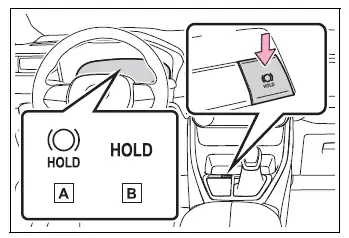
■ Brake hold system operating conditions
The brake hold system cannot be enabled under either of the following conditions:
- The driver's door is not fully closed.
- The driver is not wearing the seat belt.
If either condition is detected after the brake hold system has been enabled, the system will turn off and the green brake hold standby indicator will go out. If a condition is detected while the system is actively holding the brakes, a warning buzzer will sound and a message will appear on the multi-information display. The parking brake will then be applied automatically to help keep the Toyota RAV4 stationary.
■ Brake hold function
- If the brake pedal remains released for approximately 3 minutes after the brake hold function begins holding the vehicle, the parking brake will be applied automatically. A warning buzzer will sound and a notification will be displayed on the multi-information display.
- To turn the brake hold system off while it is actively holding the brakes, firmly depress the brake pedal and press the brake hold switch again.
- The brake hold function may be unable to keep the vehicle stationary on a steep incline. Under these conditions, the driver may need to continue applying the brake pedal. A warning buzzer will sound, and the multi-information display will provide a message describing the situation. Read the displayed message carefully and follow its instructions.
■ When the parking brake is set automatically while the system is holding the brakes
Use either of the following methods to release the parking brake:
- Depress the accelerator pedal gradually.
The parking brake will not be released automatically if the driver's seat belt is not fastened.
- Depress the brake pedal and operate the parking brake switch.
Before beginning to drive, confirm that the parking brake indicator light has turned off.
■ When an inspection at your Toyota dealer is necessary
If the green brake hold standby indicator does not illuminate when the brake hold switch is pressed, even though all operating conditions have been satisfied, the system may be malfunctioning. Have the vehicle inspected by your Toyota dealer.
■ If "Brake Hold Malfunction Press Brake to Deactivate Visit Your Dealer" or "Brake Hold Malfunction Visit Your Dealer" is displayed on the multi-information display
This message may indicate a malfunction in the brake hold system.
Have the Toyota RAV4 inspected by your Toyota dealer as soon as possible.
■ Warning messages and buzzers
Warning messages and buzzers alert the driver to a possible system malfunction or a condition requiring additional caution. Whenever a message appears on the multi-information display, read it carefully and follow the instructions provided.
WARNING
■ When the vehicle is on a steep incline
Use particular caution when relying on the brake hold system on a steep incline. The function may not generate enough holding force to keep the vehicle stationary under certain conditions.
The system may also fail to activate depending on the angle and severity of the slope. Be prepared to keep the brake pedal depressed whenever necessary.
■ When stopped on a slippery road
The brake hold system cannot prevent movement when the available tire grip has been exceeded. Do not rely on the system to hold the vehicle stationary on a slippery road surface.
NOTICE
■ When parking the vehicle
The brake hold system is not intended to secure the vehicle during long-term parking. Turning the engine switch off while the system is holding the brakes may release the brakes and allow the vehicle to move. Before operating the engine switch or leaving the vehicle, depress the brake pedal, move the shift lever to P, and apply the parking brake securely.