
Toyota RAV4: Before driving - Adjusting the steering wheel and mirrors
Steering wheel Toyota RAV4 fifth generation
Adjustment procedure
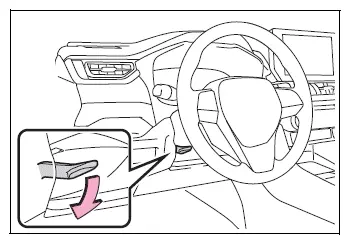
1. Hold the steering wheel firmly with one hand and push the steering wheel adjustment lever downward to release the locking mechanism.
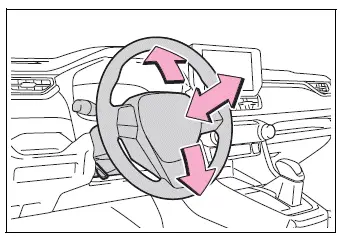
2. Move the steering wheel horizontally and vertically until it reaches a comfortable position that supports a proper driving posture and a clear view of the instruments.
After completing the adjustment, pull the lever upward to lock the steering wheel securely in place.
WARNING
■ Caution while driving
Do not attempt to adjust the steering wheel while the Toyota RAV4 is moving.
Adjusting the steering wheel while driving may cause the driver to lose control of the vehicle, potentially resulting in an accident, death, or serious injury.
■ After adjusting the steering wheel
Make sure the steering wheel is securely locked before driving.
If the steering wheel is not properly locked, it may move unexpectedly and interfere with vehicle control, possibly causing an accident resulting in death or serious injury. The horn may also fail to sound correctly when the steering wheel is not securely locked.
Sounding the horn
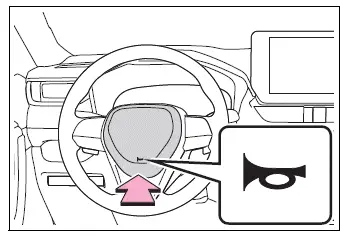
To sound the horn, press firmly on or near the  mark in the center area of the steering wheel.
Inside rear view mirror Toyota RAV4 (XA50)
The inside rear view mirror can be positioned to provide the driver with a clear and sufficient view of the area behind the Toyota RAV4.
Adjusting the height of rear view mirror
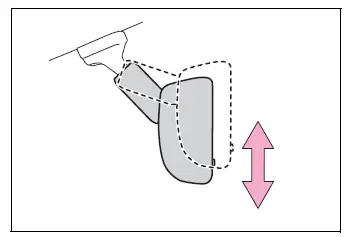
The height of the inside rear view mirror can be adjusted to match the driver's seating position and driving posture.
Move the rear view mirror carefully upward or downward until the rear window and the area behind the vehicle can be seen clearly.
WARNING
■ Caution while driving
Do not adjust the position of the inside rear view mirror while driving.
Attempting to adjust the mirror while the Toyota RAV4 is moving may distract the driver, interfere with vehicle control, and cause an accident resulting in death or serious injury.
Anti-glare function (vehicles with manual anti-glare inside rear view mirror)
Reflected light from the headlights of vehicles traveling behind can be reduced by moving the mirror lever to the anti-glare position.
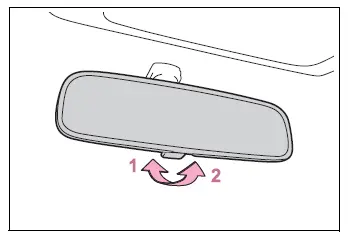
- Normal position
- Anti-glare position
Anti-glare function (vehicles with auto anti-glare inside rear view mirror)
The automatic anti-glare mirror responds to the brightness of headlights from vehicles behind and automatically reduces reflected glare when necessary.
Changing the automatic anti-glare function between ON and OFF modes
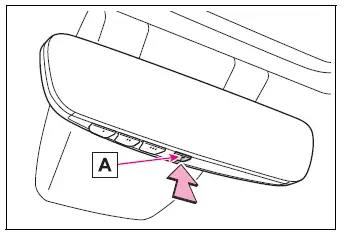
When the automatic anti-glare function is operating in ON mode, indicator A illuminates.
The function automatically returns to ON mode each time the engine switch is turned to ON.
Press the button to switch the automatic anti-glare function to OFF mode. Indicator A turns off at the same time.
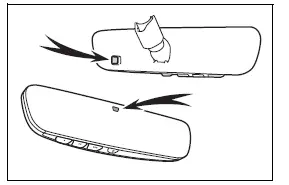
■ To prevent sensor error (vehicles with auto anti-glare inside rear view mirror)
To ensure accurate operation of the automatic anti-glare function, do not touch, obstruct, or cover the mirror sensors.
Digital Rear-view Mirror Toyota RAV4 compact crossover
The Digital Rear-view Mirror uses a camera installed at the rear of the Toyota RAV4 to show a live image on the mirror display.
The lever allows the driver to switch between conventional optical mirror mode and digital mirror mode.
In digital mirror mode, the driver can view the area behind the vehicle even when rear head restraints, passengers, or luggage obstruct the conventional mirror view.
Because the rear seating area is not shown in the camera image, the system also provides greater privacy for passengers seated in the rear.
WARNING
Observe the following precautions.
Failure to follow these precautions may result in death or serious injury.
■ Before using the Digital Rear-view Mirror
- Make sure the Digital Rear-view Mirror is properly adjusted before driving.
- Switch to optical mirror mode and adjust the physical position of the mirror so that the area behind the vehicle can be viewed correctly.
- Switch to digital mirror mode and adjust the display settings to provide a clear and comfortable rear view.
- The area and apparent distance shown by the Digital Rear-view Mirror differ from the view provided by an optical mirror. Familiarize yourself with this difference before driving the Toyota RAV4.
System components
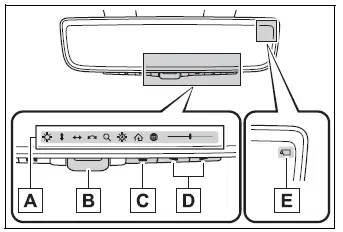
- Icon display area
Displays operating icons, adjustment gauges, and other setting information. - Lever
Use the lever to switch between digital mirror mode and optical mirror mode. - Menu button
Press the button to display the icon area and select the setting that you want to adjust. - Select/adjust button
Press the button to change or fine-tune the selected display setting. - Camera indicator
Shows that the rear camera is operating normally.
Changing modes Toyota RAV4 (XA50)
Operate the lever to switch the Digital Rear-view Mirror between digital mirror mode and optical mirror mode. Select the mode that provides the clearest view of the area behind the Toyota RAV4 under the current driving conditions.
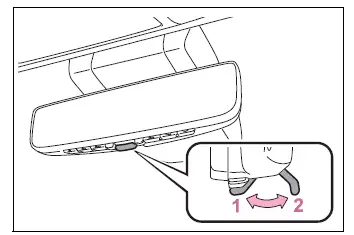
- Digital mirror mode
Displays the camera image of the area behind the vehicle on the Digital Rear-view Mirror screen. illuminates while this mode is active.
 - Optical mirror mode
Turns off the Digital Rear-view Mirror display, allowing the unit to function as a conventional optical rear-view mirror.
■ Digital mirror mode operating condition
Digital mirror mode is available when the engine switch is turned to ON.
When the engine switch is changed from ON to OFF or ACC, the camera image remains visible briefly and then disappears after several seconds.
■ When using the Digital Rear-view Mirror in digital mirror mode
- If the displayed image is difficult to see because light is reflecting from the mirror surface, the rear camera is dirty or covered with water droplets, the headlights of a vehicle behind are distracting, or the image itself is uncomfortable to view, switch to optical mirror mode.
- When the back door is open, the camera image on the Digital Rear-view Mirror may not be displayed correctly. Before driving the Toyota RAV4, confirm that the back door is fully closed.
- If reflected light makes the display difficult to see, close the moon roof sunshade, if equipped, or the electronic sunshade for the panoramic moon roof, if equipped.
- Any of the following conditions may occur while driving in dark surroundings, such as at night. These characteristics do not indicate a malfunction:
- The colors of objects shown in the camera image may differ from their actual colors.
- Depending on the height and brightness of the lights on a vehicle behind, the surrounding area in the image may appear white or blurred.
- Automatic image adjustment used to brighten the surrounding view may cause temporary flickering.
If the displayed image remains difficult to see or the flickering causes discomfort, change to optical mirror mode and use the conventional reflected view.
- The Digital Rear-view Mirror may become warm or hot while operating in digital mirror mode.
This condition does not indicate a malfunction.
- Depending on the driver's age or physical condition, focusing on the displayed image may take longer than focusing on a conventional mirror. If the image is uncomfortable or difficult to focus on, switch to optical mirror mode.
- Do not allow passengers to stare continuously at the displayed image while the Toyota RAV4 is moving, as viewing it for an extended period may cause motion sickness.
■ When the system malfunctions
If the symbol shown in the illustration appears while the Digital Rear-view Mirror is operating in digital mirror mode, the system may have a malfunction. The symbol may disappear after several seconds, but the mirror should be switched to optical mirror mode using the lever. Have the vehicle inspected by your Toyota dealer.
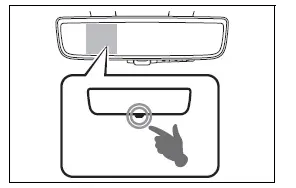
Adjusting the mirror Toyota RAV4 compact crossover
■ Adjusting the mirror height
The height of the rear-view mirror can be adjusted to match the driver's seating position and provide a clear view of the area behind the Toyota RAV4.
Switch the Digital Rear-view Mirror to optical mirror mode, and then move the mirror carefully upward or downward until it is positioned correctly for your driving posture.
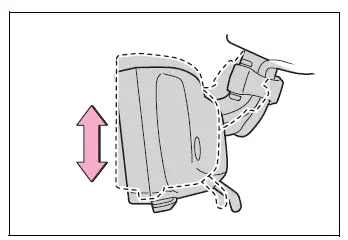
■ Display settings (digital mirror mode)
In digital mirror mode, various display settings can be adjusted, including image brightness, viewing area, image angle, zoom level, and operation of the automatic anti-glare function.
1. Press the menu button.
The available adjustment icons will appear on the Digital Rear-view Mirror display.
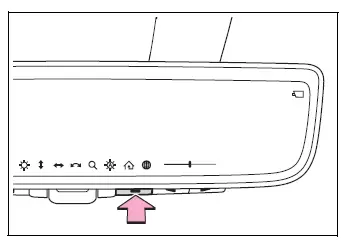
2. Press the menu button repeatedly until the item you want to adjust is selected.
3. Press  or
or  to change the selected setting.
The adjustment icons disappear automatically if no button is operated for approximately 5 seconds or longer.
 Select this item to adjust the brightness of the displayed image.
 Select this item to move the displayed viewing area upward or downward.
 Select this item to move the displayed viewing area to the left or right.
 Select this item to adjust the angle of the displayed image.
 Select this item to zoom the displayed image in or out.
 Select this item to enable or disable the automatic anti-glare function.* The function responds to the brightness of headlights from vehicles behind the Toyota RAV4 and automatically adjusts the reflected light.
The automatic anti-glare function is enabled each time the engine switch is changed to ON.
 Select this item to display the HomeLink Training Tutorial, which provides guidance for training the Garage Door Opener System.
 Select this item to change the language used by the HomeLink Training Tutorial.
*: The automatic anti-glare function operates in optical mirror mode, but its setting can also be changed while the Toyota RAV4 Digital Rear-view Mirror is being used in digital mirror mode.
■ Enabling/disabling the automatic anti-glare function (optical mirror mode)
The automatic anti-glare function used in optical mirror mode can be enabled or disabled. This setting can be changed while the mirror is operating in either digital mirror mode or optical mirror mode.
When using the optical mirror mode
1. Press the menu button to display the available mirror settings.
The available adjustment icons will appear on the Digital Rear-view Mirror display.
2. Press the menu button repeatedly until  is selected.
The automatic anti-glare setting screen will then be displayed.
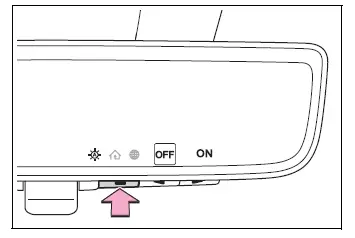
3. Press  or
or  to enable the automatic anti-glare function by selecting ON or disable it by selecting OFF.
The icons disappear automatically if no button is operated for approximately 5 seconds or longer.
■ Adjusting the display (digital mirror mode)
- If the displayed image is adjusted, it may appear slightly distorted. This characteristic does not indicate a malfunction.
- If the brightness of the Digital Rear-view Mirror is set too high, prolonged viewing may cause eye strain. Select a comfortable brightness level that allows the image to be seen clearly. If your eyes become tired or focusing on the image becomes uncomfortable, switch the Toyota RAV4 mirror to optical mirror mode.
- The brightness of the Digital Rear-view Mirror changes automatically in response to the brightness of the area in front of the vehicle.
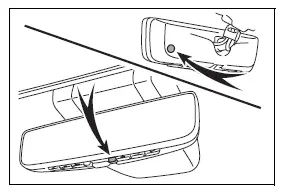
■ To prevent the light sensors from malfunctioning
Do not touch, cover, or obstruct the light sensors, as doing so may prevent them from detecting surrounding brightness correctly and interfere with normal mirror operation.
WARNING
Observe the following precautions.
Failure to follow these precautions may result in death or serious injury.
■ While driving
- Do not adjust the position of the Digital Rear-view Mirror or change its display settings while driving.
Stop the Toyota RAV4 in a safe location before operating the Digital Rear-view Mirror controls.
Attempting to make adjustments while driving may distract the driver, lead to incorrect steering operation, and cause an unexpected accident.
- Always remain aware of the surrounding traffic, pedestrians, obstacles, and road conditions rather than relying only on the mirror image.
Vehicles and other objects may appear different in size or distance when comparing digital mirror mode with optical mirror mode.
When reversing, directly check the area around the vehicle, particularly the space behind the Toyota RAV4, to confirm that it is safe before moving.
When another vehicle approaches from behind in dark conditions, such as at night, the surrounding area shown on the display may appear dim.
■ To prevent causes of fire
If smoke or an unusual odor comes from the Digital Rear-view Mirror, continuing to use the system may result in a fire. Stop using the mirror immediately and contact your Toyota dealer.
Cleaning the Digital Rearview Mirror Toyota RAV4 compact crossover
■ Cleaning the mirror surface
If the mirror surface becomes dirty, smudged, or dusty, the image shown on the display may be difficult to see clearly.
Clean the mirror surface gently with a soft, dry cloth. Wipe carefully to avoid scratching or damaging the surface of the Toyota RAV4 Digital Rear-view Mirror.
■ Cleaning the camera
If dirt, dust, or water droplets collect on the camera lens, the displayed image may appear blurred or unclear. In this case, gently clean the lens using a soft cloth dampened with water or a suitable swab.
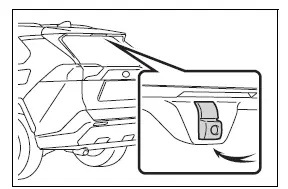
■ The camera
The camera used by the Digital Rear-view Mirror is located in the position shown in the illustration. Keep the area in front of the camera unobstructed so that a clear rear image can be displayed.
■ The cooling fan
A cooling fan is built into the Digital Rear-view Mirror. A fan operating sound may be heard while the system is in use, which is a normal part of mirror operation.
NOTICE
■ To prevent the Digital Rear-view Mirror from malfunctioning
- Do not use thinner, benzene, alcohol, or other strong cleaning agents on the mirror. These substances may discolor, deteriorate, or permanently damage the mirror surface.
- Do not remove, disassemble, alter, or otherwise modify the Digital Rear-view Mirror.
■ To prevent the camera from malfunctioning
- Observe the following precautions to help ensure that the Toyota RAV4 Digital Rear-view Mirror continues to operate correctly.
- Do not strike the camera or expose it to a strong impact, as this may alter its installed position or viewing angle.
- Do not remove, disassemble, modify, or reposition the camera.
- Do not allow organic solvents, vehicle wax, window cleaner, glass coatings, or similar substances to adhere to the camera. If any of these materials contact the camera, wipe them off as soon as possible.
- When cleaning the camera lens, wipe it gently with a soft cloth dampened with water.
Do not rub the lens forcefully, as scratching the surface may prevent the camera from transmitting a clear image.
- When applying colored or transparent film to the rear window glass, do not place the film over the area directly in front of the camera.
If film covers the camera viewing area, the rear image may become unclear or may not be displayed correctly.
- Do not subject the camera to a strong impact, as doing so may cause a malfunction.
If the camera or the surrounding area has received a strong impact, have the Toyota RAV4 inspected by your Toyota dealer as soon as possible.
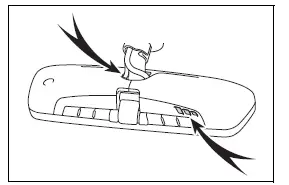
- Do not cover or obstruct the ventilation openings in the mirror housing. Blocking airflow may cause the mirror to overheat, resulting in a malfunction or fire.
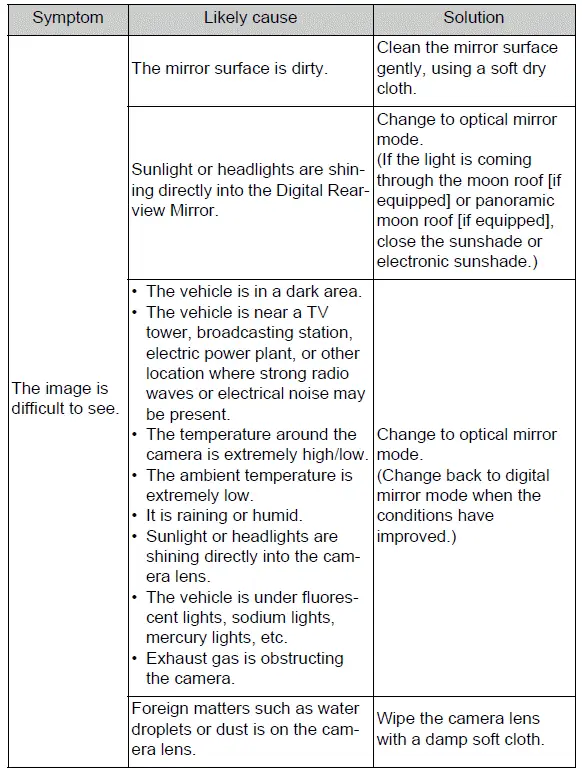
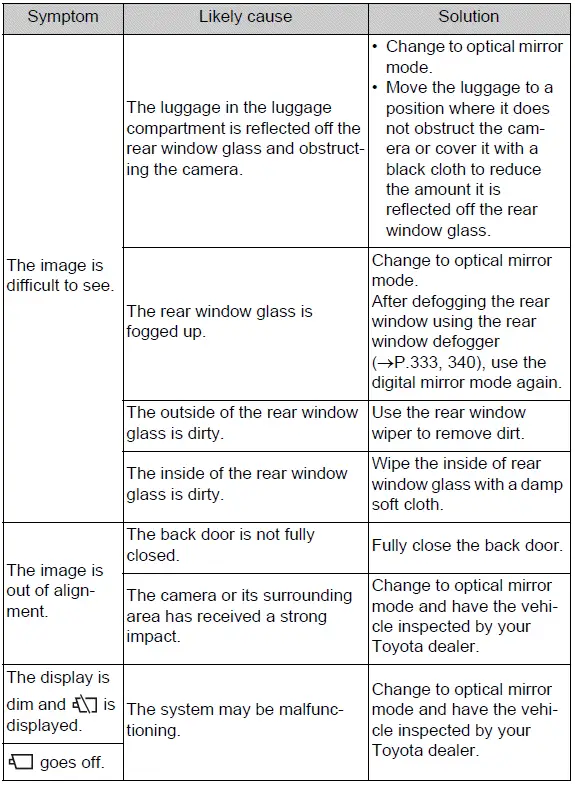
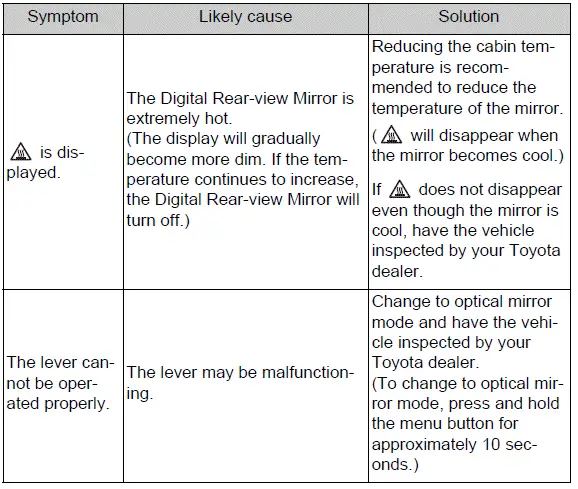
If you notice any symptoms
If you notice any of the following symptoms while using the Digital Rear-view Mirror, refer to the tables below for the likely cause and the recommended corrective action.
If the symptom remains after the specified solution has been performed, have the vehicle inspected by your Toyota dealer.
Outside rear view mirrors Toyota RAV4 hybrid
The outside rear view mirrors can be adjusted to provide a clear view of the areas behind and alongside the Toyota RAV4.
■ When using the outside rear view mirrors in cold weather
When temperatures are low and the outside rear view mirrors are frozen, it may not be possible to fold, extend, or adjust the mirror surfaces. Remove any ice, snow, or other frozen material covering the mirrors before attempting to operate them.
■ Defogging the mirrors (if equipped)
The outside rear view mirrors can be cleared using the built-in mirror defoggers.
Turn on the rear window defogger to activate the outside rear view mirror defoggers at the same time.
WARNING
■ Important points while driving
Observe the following precautions whenever driving the vehicle.
Failure to follow these precautions may result in loss of vehicle control and an accident causing death or serious injury.
- Do not adjust the outside rear view mirrors while driving.
- Do not drive with either outside rear view mirror folded against the vehicle.
- Make sure both the driver-side and passenger-side mirrors are fully extended and correctly adjusted before driving.
■ When the mirror defoggers are operating (if equipped)
Do not touch the outside rear view mirror surfaces while the defoggers are operating, as the glass may become hot enough to cause burns.
Adjustment procedure
1. Press the mirror selection switch to choose the outside rear view mirror you want to adjust.
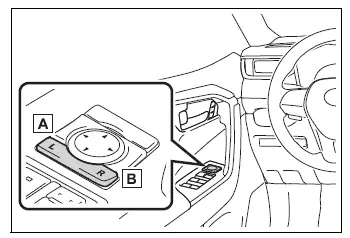
- Left mirror
- Right mirror
2. Press the adjustment switch in the appropriate direction until the selected mirror provides the desired rear and side view.
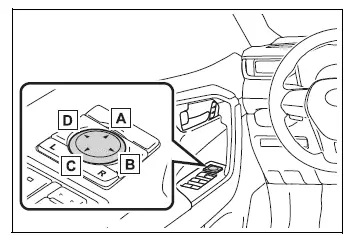
- Up
- Right
- Down
- Left
■ Mirror angle can be adjusted when
The outside rear view mirror angle can be adjusted when the engine switch is in ACC or ON.
Folding the mirrors
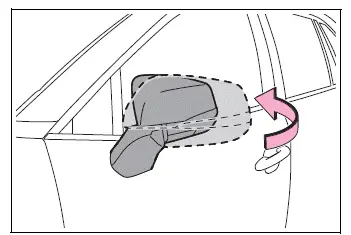
To fold an outside rear view mirror manually, push the mirror housing rearward in the direction of the back of the vehicle. Extend and readjust the mirror before driving the Toyota RAV4.
WARNING
■ When a mirror is moving
To prevent personal injury and damage to the mirror mechanism, keep your hands and fingers away from the moving mirror and the area between the mirror housing and the vehicle body.