
Toyota RAV4: Pictorial index - Switches
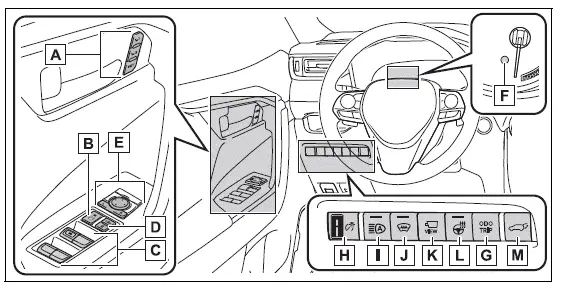
This illustration identifies the switches located around the driver's door and lower instrument panel. Availability depends on the equipment fitted to the Toyota RAV4.
- Driving position memory switches*1
Storing and recalling available driving position settings - Window lock switch
Disabling passenger power window operation when necessary - Power window switches
Opening and closing the side windows from the driver's control panel - Door lock switches
Locking or unlocking the side doors from inside the vehicle - Outside rear view mirror switches
Selecting and adjusting the outside rear view mirrors - "ODO TRIP" switch (vehicles with 7-inch multi-information display)
Changing or resetting the supported odometer and trip information - "ODO TRIP" switch (vehicles with 12.3-inch multi-information
display)
Changing or resetting the supported odometer and trip information - Instrument panel light control dial
Adjusting the brightness of the instrument panel illumination - Automatic High Beam switch
Activating or deactivating the Automatic High Beam function - Windshield wiper de-icer switch*1
Operating the de-icer used to help release frozen windshield wipers - Camera switch*1, 2
Accessing the available camera display functions - Heated steering wheel switch*1
Turning the heated steering wheel function on or off - Power back door switch*1
Operating the power back door from inside the vehicle
*1: If equipped
*2: Refer to "MULTIMEDIA OWNER'S MANUAL".
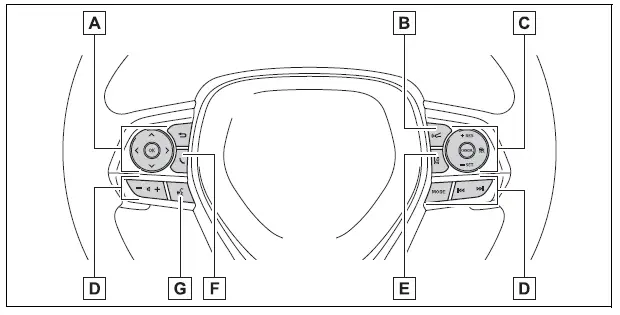
The steering wheel controls allow the driver to operate selected display, driver-assistance, audio, and communication functions while keeping frequently used commands close at hand.
- Meter control switches
Navigating supported meter and multi-information display settings - Vehicle-to-vehicle distance switch
Adjusting the selected following-distance setting for the supported cruise control function - Cruise control switches
Operating Dynamic Radar Cruise Control with full-speed range - Audio remote control switches*
Managing supported audio functions from the steering wheel - LTA (Lane Tracing Assist) switch
Turning Lane Tracing Assist on or off as required - Phone switch*
Accessing supported hands-free phone functions - Talk switch*
Activating supported voice-control functions
*: Refer to "MULTIMEDIA OWNER'S MANUAL".
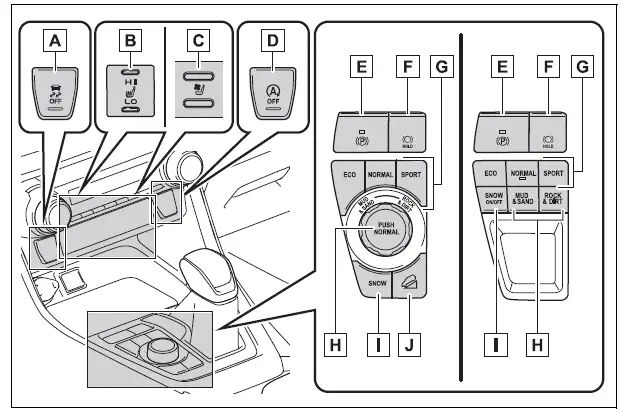
The center console switch group provides access to selected stability, comfort, braking, and driving-mode controls. Some switches are installed only on Toyota RAV4 vehicles with the corresponding equipment.
- VSC OFF switch
Changing the operating status of the supported vehicle stability control functions - Front seat heater switches*
Selecting the available heating setting for the front seats - Front seat heater/ventilator switches*
Operating the available front seat heating or ventilation functions - Stop & Start cancel switch*
Canceling the Stop & Start function when required - Parking brake switch
Applying and releasing the parking brake
Following parking brake precautions during the winter season
Responding to a related warning buzzer or message - Brake hold switch
Activating or deactivating the brake hold function - Driving mode select switch
Selecting an available driving mode to suit current driving conditions - Multi-terrain Select switch*
Selecting an available setting for supported off-road surface conditions - SNOW mode switch*
Selecting SNOW mode when driving conditions require it - "DAC" switch*
Operating the available downhill assist control function
*: If equipped