
 Toyota Yaris: Clock
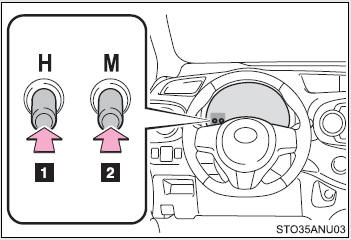
 Adjusts the hours
 Adjusts the minutes
■The clock is displayed when
The engine switch is in the “ON” position.
■When disconnecting and reconnecting battery terminals
The clock data will be reset.
 Vanity mirrors
Slide the cover to open. ...
 Outside temperature display
The temperature display shows temperatures within the ranges of -40°F (-40°C)
and 122°F (50°C).
Except Canada
Canada
■The outside temperature is displayed when
The engine switch is ...
See also:
Front fender apron (ASSY)
REPLACEMENT
With the cowl top side panel removed.
REMOVAL
INSTALLATION
Temporarily install the new parts and measure each part of the new parts in accordance
with the body dimension diagra ...
Items to initialize
The following items must be initialized for normal system operation after
such cases as the battery being reconnected, or maintenance being performed on the
vehicle:
...
Rear floor crossmember NO.2 (ASSY): Sedan
REPLACEMENT
REMOVAL
INSTALLATION
Temporarily install the new parts and measure each part of the new parts in accordance
with the body dimension diagram. (See the body dimen ...